
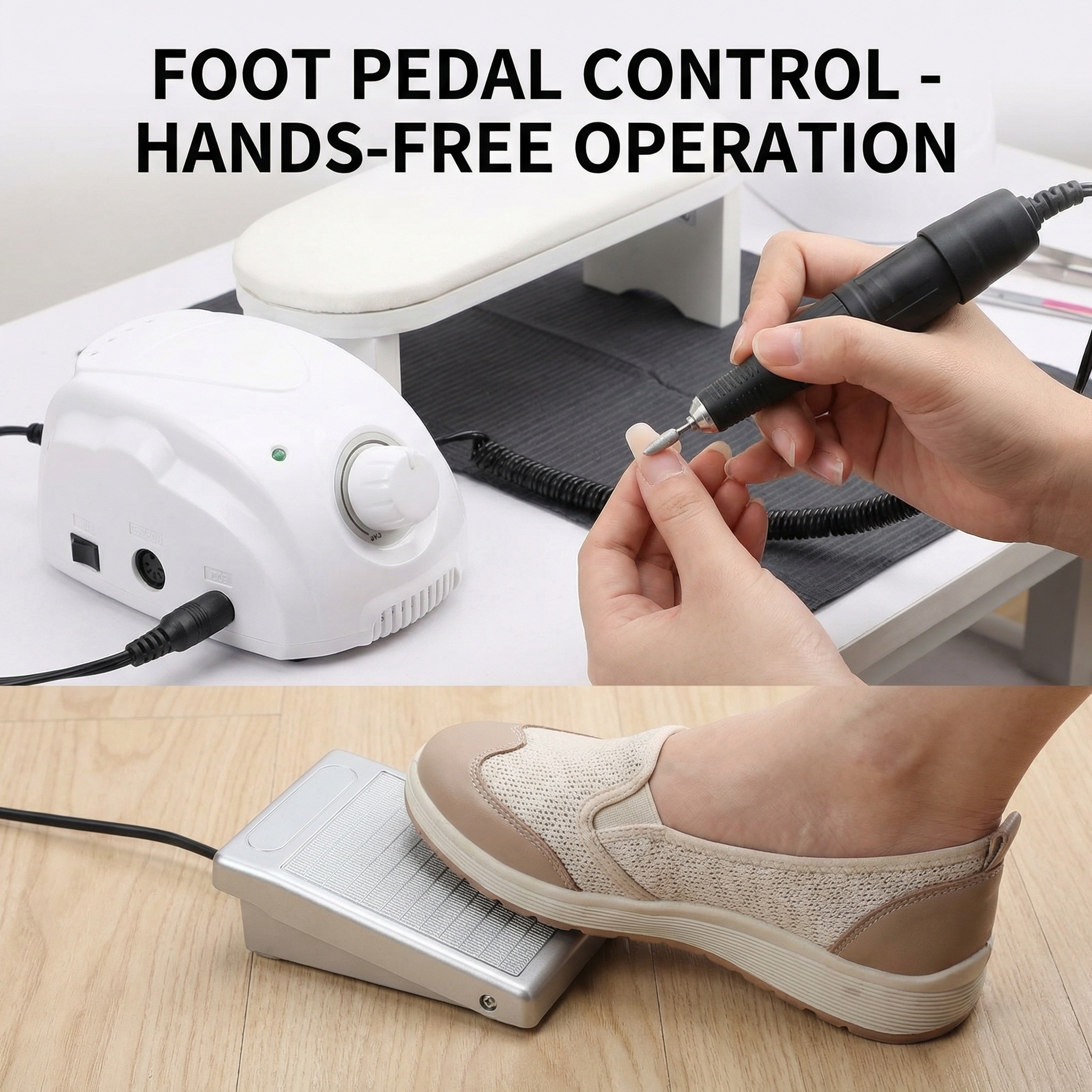

这是款美甲打磨机35000转抛光机电动磨甲器 第一张产品主图:…
这是款美甲打磨机35000转抛光机电动磨甲器 第一张产品主图:突出他的卖点 第2张图:精品轴承高速转子运转平稳 第3张图:产品质量 第4张图:专业级性能,适用于沙龙和家庭使用。 第5张图:轻松控制配备
1qphx8kisfh...
2026.02.02这是款美甲打磨机35000转抛光机电动磨甲器 第一张产品主图:突出他的卖点 第2张图:精品轴承高速转子运转平稳 第3张图:产品质量 第4张图:专业级性能,适用于沙龙和家庭使用。 第5张图:轻松控制配备
1qphx8kisfh...
2026.02.02


![[主图5] 多场景多甲型适用合集图,四宫格圆形小图环绕中心产品,分别展示打磨手指甲、打磨厚脚趾甲、指甲锉随身收纳进化妆包、美甲沙龙专业使用四个场景。氛围风格为极简轻奢医美风,干净通透。画质为8K超写实高清商业产品摄影,每个场景都清晰自然。保持指甲锉外观、物理结构、材质质感、颜色与输入产品图绝对一致,杜绝任何变形和色差,精细化处理。光影为每个场景都使用柔和均匀光线,整体光影统一。配色为浅灰低饱和背景,四宫格圆形边框简洁干净。文字版式:顶部放置英文大字标题 "Wide Use For Fingernail & Toenail, Home & Travel",深色无衬线字体,清晰醒目不遮挡主体。输出要求:1:1正方形比例,文字清晰可辨,8K超写实高清商业摄影质感。负向提示词:变形,文字错乱,产品模糊,背景杂乱,水印,电商平台Logo,中文,硬阴影,杂乱背景](https://gd-cms.dancf.com/gd-cms/xi19e5/0/50b4f5af-1342-48aa-b332-e647d3d2f48823748.png?x-oss-process=image/resize,w_640,type_6/sharpen,120/interlace,1)







![[第7张修正] 使用操作步骤页。重点修正:洁牙器工作尖替换为弯钩形金属洁牙工作尖(银色弯钩尖头+黑色连接段)。本张使用【图9】薄荷绿款+【新图】工作尖参考。
[氛围/风格] 简洁步骤说明,清晰易懂。
[元素布局] 4步横向流程图:第1步安装弯钩形工作头长按开机、第2步选择档位、第3步轻贴牙面缓慢移动、第4步关机冲洗套防尘盖;第3步配手部持握操作特写。
[光影质感] 柔和自然光,操作场景真实。
[配色色系] 全局底色 #F5F9FF 浅蓝白;主色蓝色。
[视角构图] 2x2网格布局。
[文字版式] 顶部标题"Easy 4-Step Operation";4步标题及小字说明;底部安全提示"For hard tooth surfaces only. Avoid gums."。全部英文。
[比例分辨率] 9:16竖版比例,4K分辨率,高清画质。
[负向提示词] 工作尖形状错误,直头工作尖,产品变形,中文文字,水印。](https://gd-cms.dancf.com/gd-cms/xi19e5/0/3124b571-dff9-441d-9a32-733779ea087918115.jpeg?x-oss-process=image/resize,w_640,type_6/sharpen,120/interlace,1)

![[垫图] https://gdesign-dam-hz.dancf.com/35908246140725370/179bf3bc686642d1af7a260fa049c965.jpg
[主图主题] Key Features of Pressurized Steam Cleaner
[氛围/风格] Clean infographic style, professional product display
[画面 elements] The main steam cleaner machine is placed in the center of the canvas. Four core functional points are connected to the corresponding parts of the product with thin clean lines and small round dots. The background is a clean light gray gradient, soft light, all elements are clearly organized, full screen background without borders.
[配色色系] Light gray background, text is dark gray, connecting lines are black, product keeps original black and white colors.
[视角构图] Centered layout, flat lay, product is the main focus.
[文字版式] Connected text labels for each feature: 1. "1000W High Power Heating" (points to main body) 2. "360° Flexible Hose" (points to hose) 3. "Detachable Water Tank" (points to tank) 4. "Multi-brush Head Kit" (points to accessories). All labels are in English, sans-serif font, clean and easy to read.
[比例分辨率] 1:1 2048x2048px resolution](https://gd-cms.dancf.com/gd-cms/xi19e5/0/34ca2f01-fd0b-4b4f-83c7-30ee13a5b8799605.jpg?x-oss-process=image/resize,w_640,type_6/sharpen,120/interlace,1)
![[主图-4] 磁吸式大屏数显可拆卸控制面板细节展示,操作便捷卖点。
[统一基调] 跨境亚马逊信息图风格,浅米白渐变背景,深棕色标题字,蓝色科技光效,圆角标注线,无衬线粗体英文字体。
[画面] 画面主体展示膝盖按摩仪的控制面板细节,一只手正将黑色数显面板从护膝上磁吸取下/装上,面板与护膝之间有蓝色闪电光效示意磁吸连接。面板放大展示,用引线标注四个按键和数显屏幕:开关键/档位键(Power/Level)、热敷键(Heat)、脉冲模式键(Pulse Mode 9 levels)、脉冲档位键(Pulse Level),屏幕显示蓝色数字。顶部大标题"Magnetic LED Display Detachable Control"。
[光影质感] 控制面板细节清晰,按键图标可辨识,屏幕蓝光柔和,手部动作自然真实,磁吸光效科技感。
[配色] 浅米白背景,深棕色标题,蓝色科技光效,黑色面板,灰色护膝。
[文字版式] 顶部大标题粗体大号,标注文字中号,引线清晰,全部英文横排。
[输出要求] 1:1正方形比例,文字清晰,产品细节清晰,无变形、错字、模糊、水印、平台Logo。](https://gd-cms.dancf.com/gd-cms/xi19e5/0/b1839a5f-a8a1-4d12-9624-79d4558c131f1570.jpeg?x-oss-process=image/resize,w_640,type_6/sharpen,120/interlace,1)


![[垫图]https://gd-visitor.dancf.com/tmp02/b227256fce4bfbb0576a15661a0b215e/8abc97b98007413faee204baf378902a.png
[主图主题]折叠脚踏梯细节特写展示
[氛围/风格]质感细节风,光影突出材质
[画面元素]画面分为三个圆形局部放大区域:左上角放大展示踏面的防滑纹理细节,右上角放大展示红色安全锁扣的卡扣结构,底部放大展示防滑橡胶脚垫的防滑纹理,背景为浅灰色,产品整体在画面右侧小比例展示,光影柔和突出材质质感,背景铺满全屏无边框
[配色色系]主色:黑色(踏面/脚垫)、红色(锁扣)、白色(支架);背景浅灰
[视角构图]微距特写与整体展示结合,视觉层次清晰
[文字版式]每个放大区域旁悬浮白色英文说明文字:「Non-slip Pedal Texture」、「Secure Safety Lock」、「Wear-resistant Foot Pad」,顶部居中悬浮粗体英文标题「Premium Details for Durability」,文字直接悬浮无任何底框
[比例分辨率]1:1比例,2048*2048像素,2k分辨率](https://gd-cms.dancf.com/gd-cms/xi19e5/0/8a576c48-d253-46d9-bfe3-046575f5c11e9311.png?x-oss-process=image/resize,w_640,type_6/sharpen,120/interlace,1)

![[主图-8] How it works simple steps展示主图。
[氛围风格] 简洁步骤讲解,清晰易懂,专业风格,符合欧美跨境审美;
[画质] 商业摄影质感,信息清晰,画面干净高级。
[元素] 保持808激光脱毛美容仪外观与输入产品图绝对一致,杜绝变形色差。产品小图放在顶部,下方分为三个步骤横排展示操作流程:1 Prepare skin 2 Treat area 3 Finish & care,每个步骤配简洁示意图标。背景为浅灰色,干净简洁。整体布局整齐,信息直观。画面满屏无边框。
[光影] 均匀柔和布光,整体明亮干净,信息清晰不暗沉。
[配色] 浅灰背景,深灰文字配彩色图标点缀,专业清爽。
[视角构图] 上下结构,产品在上,步骤在下,三步骤均匀分布,阅读逻辑清晰。
[文字版式] 顶部大标题 "SIMPLE 3 STEP PROCESS",每个步骤带编号和大标题,下方配简要说明,全部英文,字号层次清晰,排版整齐美观。
[比例分辨率] 1:1 比例,2048px x 2048px,4k 分辨率,文字清晰可辨,超高清。
[负向提示词] 变形,水印,文字错乱,产品图模糊,背景杂乱,中文](https://gd-cms.dancf.com/gd-cms/xi19e5/0/9ef20192-b2e2-41f8-b992-bc9429b6238b1255.png?x-oss-process=image/resize,w_640,type_6/sharpen,120/interlace,1)

![[主图-8] How it works simple steps展示主图。
[氛围风格] 简洁步骤讲解,清晰易懂,专业风格,符合欧美跨境审美;
[画质] 商业摄影质感,信息清晰,画面干净高级。
[元素] 保持808激光脱毛美容仪外观与输入产品图绝对一致,杜绝变形色差。产品小图放在顶部,下方分为三个步骤横排展示操作流程:1 Prepare skin 2 Treat area 3 Finish & care,每个步骤配简洁示意图标。背景为浅灰色,干净简洁。整体布局整齐,信息直观。画面满屏无边框。
[光影] 均匀柔和布光,整体明亮干净,信息清晰不暗沉。
[配色] 浅灰背景,深灰文字配彩色图标点缀,专业清爽。
[视角构图] 上下结构,产品在上,步骤在下,三步骤均匀分布,阅读逻辑清晰。
[文字版式] 顶部大标题 "SIMPLE 3 STEP PROCESS",每个步骤带编号和大标题,下方配简要说明,全部英文,字号层次清晰,排版整齐美观。
[比例分辨率] 1:1 比例,2048px x 2048px,4k 分辨率,文字清晰可辨,超高清。
[负向提示词] 变形,水印,文字错乱,产品图模糊,背景杂乱,中文](https://gd-cms.dancf.com/gd-cms/xi19e5/0/d24e5c6f-dccf-4e39-b17c-0dfedc88be471271.png?x-oss-process=image/resize,w_640,type_6/sharpen,120/interlace,1)


