![[Main Image 4] Advantages highl… - 图片创意预览](https://gd-cms.dancf.com/gd-cms/xi19e5/0/7dee05c4-d0c1-47d8-9f54-c3ac42c6aa7314245.png)

[Main Image 4] Advantages highl…
[Main Image 4] Advantages highlight page. Low gray background, product placed at top, 4 core advanta
Tiny Jinan...
2026.07.09[Main Image 4] Advantages highlight page. Low gray background, product placed at top, 4 core advanta
Tiny Jinan...
2026.07.09![[第3屏] Core advantage overview page. Layout: left large product image, right 6 modular cards for key advantages. 本屏使用原图2作为产品主体. Keep product appearance, structure, color consistent with original image. Each card contains one advantage, large bold title short description: 1. REAL-TIME MONITORING → Arc voltage tracking 2. DYNAMIC ADJUST → Constant stand-off distance 3. LESS DROSS → Smoother cut finish 4. COLLISION PROTECTION → Prevents torch damage 5. ANTI-INTERFERENCE → Stable in strong EMI 6. FULL ENGLISH UI → Easy operation. Background #f0f4f8 light blue-gray. Cards dark blue with white text, clear separation. 9:16 vertical proportion, 4K resolution. Negative prompt: product deformation, wrong text, Chinese characters, messy cards.](https://gd-cms.dancf.com/gd-cms/xi19e5/0/2de507cb-17a6-4374-8d7f-dcadf52316e413792.jpeg?x-oss-process=image/resize,w_640,type_6/sharpen,120/interlace,1)
![[Main Image 8] Complete package showcase. Light gray background, arrange all three components (controller, lifting motor, mounting clamp) neatly in Knolling layout. Large title "COMPLETE PACKAGE
READY TO INSTALL". Keep each component appearance consistent with input image 8, clear size proportion. 1:1 2048x2048, clean professional arrangement. Negative prompt: missing parts, deformation, text error, Chinese characters.](https://gd-cms.dancf.com/gd-cms/xi19e5/0/3f2c26e8-4073-490c-9097-d448d71c753f13872.jpeg?x-oss-process=image/resize,w_640,type_6/sharpen,120/interlace,1)
![[第5屏] Core parameter technical display page. 本屏使用原图4 product. Background dark blue tech style. Product main image placed at top, parameter table at bottom. Keep product appearance consistent with original image. Clear parameter table with two columns: Parameter / Specification: Working Power → DC 24V, Rated Output → 2.5A, Arc Voltage Range → 30V~250V, Lifting Speed → 1000~4000mm/min, Voltage Divide → 5:1, Operating Temp → -10°C~60°C, Dimension → 254×171×70mm, Protection → Over-current. All parameters white text on dark blue background, each row clear separation. Title top "CORE TECHNICAL PARAMETERS", large bold white. 9:16 vertical proportion, 4K resolution. Negative prompt: wrong parameters, product deformation, Chinese characters, blurry text.](https://gd-cms.dancf.com/gd-cms/xi19e5/0/ecd59a98-62cd-4198-a6a0-660368ca2f8413887.jpeg?x-oss-process=image/resize,w_640,type_6/sharpen,120/interlace,1)
![[Main Image 6] Terminal connection interface showcase. Light blue background, focus on the back terminal block of controller. Clear text labels: "TO CNC", "TO TORCH POWER", "USB PORT", clear green terminal blocks and power switch. Large title "STANDARD INTERFACE
EASY WIRING". Keep product structure 100% consistent with input image 6. 1:1 2048x2048, sharp focus, professional industrial style. Negative prompt: deformation, wrong label, text garble, Chinese characters.](https://gd-cms.dancf.com/gd-cms/xi19e5/0/1d9bc93a-5302-4e39-a004-14896d74bd2714251.jpeg?x-oss-process=image/resize,w_640,type_6/sharpen,120/interlace,1)
![[第4屏] Working principle schematic page. 本屏使用原图3 as product reference. Light gray tech background, flow chart to explain working principle: 1. Monitor arc voltage → 2. Convert voltage to distance deviation → 3. Drive lifting motor via PWM → 4. Adjust torch height dynamically → 5. Maintain optimal stand-off distance. Each step uses arrow connected boxes, product main image placed in center, clear text labels. Keep product appearance consistent with original. Title top "WORKING PRINCIPLE", large bold font. Blue and gray color scheme, professional industrial style. 9:16 vertical proportion, 4K resolution. Negative prompt: product deformation, text error, Chinese characters, messy flow chart.](https://gd-cms.dancf.com/gd-cms/xi19e5/0/7edf0476-e406-494a-87d8-08082ad30cba13889.jpeg?x-oss-process=image/resize,w_640,type_6/sharpen,120/interlace,1)
![[Main Image 7] Side angle product showcase. Low gray gradient background, product placed at 45 degree angle to show complete three-side structure. Large text "WIDE COMPATIBILITY
FOR PORTABLE DESKTOP GANTRY CNC PLASMA CUTTERS". Keep product appearance consistent with input image 7. 1:1 2048x2048, soft studio lighting, clear product texture. Negative prompt: deformation, text error, Chinese characters, blurry.](https://gd-cms.dancf.com/gd-cms/xi19e5/0/b92eb5a3-6aba-4c40-9702-e1620318268013883.jpeg?x-oss-process=image/resize,w_640,type_6/sharpen,120/interlace,1)
![[Main Image 10] Application industry overview. Low gray gradient background, product placed at center, 4 application industries marked in large text around: Sheet Metal Processing, Steel Structure Manufacturing, Engineering Machinery, CNC Plasma Cutting. Title top "AUTOMATIC HEIGHT CONTROLLER
FOR PRECISE CUTTING". Keep product appearance consistent with input image 10. 1:1 2048x2048, clean high information density layout. Negative prompt: text error, deformation, blurry product, Chinese characters.](https://gd-cms.dancf.com/gd-cms/xi19e5/0/4e91314c-0d0e-41b3-8a6e-eb13ace8350f13863.jpeg?x-oss-process=image/resize,w_640,type_6/sharpen,120/interlace,1)
![[第9屏] Operation tips for piercing delay setting. 本屏使用原图8展示产品整体外观。Light gray industrial background, product placed on upper half, operation guide on bottom half. Keep product appearance and structure consistent with original input image. Title at top "OPERATION SETTING GUIDE", large bold dark font. Two key recommendation blocks below: For MAX200 plasma power supply → Recommended setting: 3s (value 30). For thin plates under 2mm → Recommended setting: below 0.5s (value < 5). Each block uses dark blue background with white bold text for key value, clear reading hierarchy. 9:16 vertical proportion, 4K resolution, professional industrial style. Negative prompt: product deformation, wrong setting value, Chinese characters, cluttered text, watermark.](https://gd-cms.dancf.com/gd-cms/xi19e5/0/02f21fb8-772c-492d-8043-da0e785221e713875.png?x-oss-process=image/resize,w_640,type_6/sharpen,120/interlace,1)
![[第10屏] Full package specification final page. 本屏 uses all components from image 10, arranged in clean Knolling layout top: main controller, lifting motor, mounting clamp. Title top "COMPLETE PACKAGE CONTENTS", parameter summary bottom: Model: F1621](https://gd-cms.dancf.com/gd-cms/xi19e5/0/952c98e9-2eba-49ea-b805-6d09fe6625b213791.jpeg?x-oss-process=image/resize,w_640,type_6/sharpen,120/interlace,1)
![[第7屏] Terminal interface detail page. 本屏使用原图6, focus on back connection terminals. Light blue-gray background, title top "CLEAR INTERFACE DESIGN
EASY WIRING INSTALLATION". Label clearly three connection areas: TO CNC, TO TORCH POWER, POWER SWITCH & USB. Show green terminal blocks, black connectors, red power switch, keep all labels and structure 100% consistent with original image. Soft directional lighting highlights terminal details. 9:16 vertical proportion, 4K resolution. Negative prompt: wrong labels, deformation, blurry, Chinese characters.](https://gd-cms.dancf.com/gd-cms/xi19e5/0/244a1ada-da75-44a5-a6a0-a66e66d1e3f513793.jpeg?x-oss-process=image/resize,w_640,type_6/sharpen,120/interlace,1)
![[Main Image 9] Side terminal showcase. Low blue gradient background, product placed to show side terminals and parameter list label. Large text left "OVERCURRENT PROTECTION" "INDUSTRIAL GRADE RELIABILITY". Keep product structure consistent with input image 9. 1:1 2048x2048, clear focus, professional industrial style. Negative prompt: deformation, text garble, Chinese characters.](https://gd-cms.dancf.com/gd-cms/xi19e5/0/acdc8c57-23ee-405a-91c7-c4f9dd48152713881.png?x-oss-process=image/resize,w_640,type_6/sharpen,120/interlace,1)
![[主图-6] 侧视细节图,展示步进电机减速机的侧面视角和电机线缆出线细节。
[统一基调] 工业风冷调,浅灰色渐变背景,主标题粗体无衬线深灰蓝色,辅助字中灰色,强调色科技蓝,字体与首图完全一致。
[画面] 产品水平放置在画面中央,电机在右减速机在左,完整展示侧面轮廓,占比约65%。左侧有引线标注指向电机线缆,右侧引线指向减速机输出轴。产品外观、标签颜色、线缆颜色与原图完全一致,不修改任何产品内容。
[光影质感] 商业摄影质感,柔和侧光突出产品圆柱轮廓和层次感,金属表面反光干净,线缆颜色(红黄绿蓝黑)真实还原,底部有自然投影。
[配色] 浅灰渐变背景,深灰蓝标题,科技蓝引线标注,统一冷调工业风。
[文字版式] 顶部居中大号粗体标题"Side View Detail";左侧引线标注"Stepper Motor with Lead Wires";右侧引线标注"Gear Reducer Output Shaft";全部统一无衬线字体,字号稍大。
[输出要求] 1:1正方形,1000x1000px,产品清晰不变形,文字清晰可读,无水印,禁止修改产品外观。](https://gd-cms.dancf.com/gd-cms/xi19e5/0/b87d8323-cd7a-437c-bba2-c015a4a3ee2d3587.jpeg?x-oss-process=image/resize,w_640,type_6/sharpen,120/interlace,1)


![[商品] 使用【图1】【图6】Hydraulic Cylinder NUGP 63 液压缸细节;从产品中提取4个关键部位做微距放大:镀铬活塞杆表面、限位开关组件、油口密封堵头、安装孔位与加工面;保留各部位真实材质、颜色与加工纹理;增强细节清晰度与金属质感。
[画面] 目标:细节微距展示页,2×2宫格呈现4个关键细节,体现精密制造品质。构图:2行2列宫格布局,每格为一个部位的微距特写,各占画面约35%;顶部标题区占画面15%;阅读动线从上到下、从左到右;每个宫格有独立的细节标题与说明。
[视觉] 套系策略:风格=跨境工业极简专业商业摄影;标题字=现代无衬线粗体(英文);正文字=简洁无衬线体(英文);主色=深炭灰/金属黑;背景延展=基于深炭灰做深浅层级渐变、金属拉丝纹理与工业质感模块;强调色=工业橙红,仅用于小面积图标、引线、数据标签和重点数字;标题色=纯白;正文色=浅银灰;组件=深色半透明信息卡、细银线引线、工业风图标;光影=微距环形柔光,清晰展现表面纹理与加工精度。
[文字] 顶部主标题"Precision in Every Detail",副标题"Crafted with German-Level Tolerance";4个宫格分别标注:1."Hard Chrome Plated Rod - Mirror Finish, Corrosion Resistant" 2."Integrated Limit Switch - Precise Position Detection" 3."Threaded Oil Ports - Standard Connection, Leak-Proof" 4."Precision Machined Mounting - Accurate Installation";全部英文横排。
[规格] 图片比例9:16竖版,4K分辨率,medium质量;避免变形、错字、文字过小、中文文字、纯白背景、细节失真、宫格比例失调。](https://gd-cms.dancf.com/gd-cms/xi19e5/0/0e714c3a-6a31-4c79-a30a-b38eb2b49fb021063.jpeg?x-oss-process=image/resize,w_640,type_6/sharpen,120/interlace,1)
![[主图-2] 产品亮点编号卖点图,展示步进电机减速机的核心优势。
[统一基调] 工业风冷调,浅灰色渐变背景,主标题粗体无衬线深灰蓝色,辅助字中灰色,强调色科技蓝,字体与首图完全一致。
[画面] 产品主体在画面右侧居中,占比约55%,产品外观与原图完全一致不做修改。左侧竖排4个编号卖点,每个编号用科技蓝圆形底白字数字,右侧配卖点文字。产品为水平放置视角,电机在右减速机在左,齿轮齿条清晰可见。
[光影质感] 商业摄影质感,主光柔和均匀,金属表面反光干净,产品底部有自然投影,融入浅灰背景。
[配色] 浅灰渐变背景,深灰蓝主标题,科技蓝编号点缀,黑白灰为主色调。
[文字版式] 顶部居中大号粗体标题"High Precision Transmission";左侧4条卖点从上到下:1."High Torque Output" 2."Low Noise Operation" 3."Durable Metal Construction" 4."Smooth Gear Engagement";全部使用统一无衬线字体,字号层级分明,标题字号最大。
[输出要求] 1:1正方形,1000x1000px,产品清晰不变形,文字清晰可读,无水印,禁止修改产品外观。](https://gd-cms.dancf.com/gd-cms/xi19e5/0/2997cca5-0305-428b-84f7-c52ca7f755b53252.jpeg?x-oss-process=image/resize,w_640,type_6/sharpen,120/interlace,1)
![[主图-3] 材质与工艺细节图,展示减速机齿轮和齿条的精密金属材质细节。
[统一基调] 工业风冷调,深灰色背景带轻微科技感渐变,主标题粗体无衬线白色,辅助字浅灰色,强调色科技蓝,字体与首图一致。
[画面] 产品主体在画面中央偏左,占比约60%,为水平放置视角。右侧有一个圆形局部放大框,放大展示齿轮齿条啮合的精密齿形细节,金属纹理清晰。产品外观、标签、线缆与原图完全一致,不修改任何产品内容。
[光影质感] 工业摄影质感,侧光突出金属质感和齿轮立体感,齿面有高光反射,金属表面纹理清晰,深色背景突出产品金属光泽。
[配色] 深灰科技背景,白色主标题,科技蓝高亮线,冷色调工业感。
[文字版式] 画面顶部大号粗体白色标题"Precision Machined Gear & Rack";放大框下方小字说明"Helical Gear Tooth Design";底部一行小字"High Strength Alloy Steel";全部统一无衬线字体。
[输出要求] 1:1正方形,1000x1000px,产品清晰,细节锐利,文字清晰,无水印,禁止修改产品外观。](https://gd-cms.dancf.com/gd-cms/xi19e5/0/5160f29a-2d54-4a2d-8ce6-97401b8256b73586.jpeg?x-oss-process=image/resize,w_640,type_6/sharpen,120/interlace,1)
![[Main Image 2] Dual function detail display of car emergency escape tool. Light gray low saturation background. Display the window breaker tip and whistle sound outlet structure in split layout. On the left is a close-up of the hardened sharp tip of the window breaker, on the right is a dual-channel structure display of the emergency whistle, with each part clearly visible. Text labels: "Hardened Steel Tip", "High Decibel Whistle", "Premium Aluminum Alloy". Keep product shape and color consistent with original images. Professional commercial photo style, clear texture, soft light. No Chinese text, no trademark. 1:1 square ratio, 2K resolution. Negative prompt: deformation, text confusion, blurred product image, messy background, watermark, Chinese characters](https://gd-cms.dancf.com/gd-cms/xi19e5/0/2c1f9ff3-3c2e-471b-9cf6-f5ae6e34c2b969748.jpeg?x-oss-process=image/resize,w_640,type_6/sharpen,120/interlace,1)

![[主图-8] 驱动方式与性价比图,展示驱动器驱动的成本优势与性能平衡。
[统一基调] 工业专业风,浅灰色渐变背景+科技蓝点缀色,产品金色金属质感保留,统一无衬线粗体英文字体(类似Arial Black/Montserrat Bold),标题字号大且醒目,辅助文字缩小50%以上,统一画框式构图,全套风格一致。
[画面] 画面左侧约50%为气缸和驱动部件的近距离特写,展示银色气缸、气管、电磁阀等细节,突出驱动器驱动结构。右侧约50%为性价比说明区:上方大标题区域,中间用天平/平衡图标示意"Performance vs Cost"的平衡,下方三个要点:1. "Driver Driven System" - 比伺服电机成本低;2. "Sufficient Accuracy" - 满足橱柜门板柜体加工;3. "Lower Maintenance Cost" - 结构简单维护成本低。底部有"High Cost-Performance Ratio"的强调条。
[光影质感] 左侧驱动部件特写为微距工业摄影质感,金属气缸表面有清晰高光和反光,气管和线缆细节清晰;右侧信息区扁平化设计,图标简洁。
[配色] 背景浅灰渐变,强调条科技蓝色配白色文字,要点图标深蓝色,说明文字深灰色。
[文字版式] 顶部大标题"Cost-Effective Drive System",右侧三个要点各带图标和英文说明,底部强调条文字加粗醒目,全部无衬线粗体英文。
[输出要求] 800×800px 1:1方图,驱动部件清晰,性价比卖点明确。负向:变形、错字、模糊、中文、部件结构失真、信息杂乱。](https://gd-cms.dancf.com/gd-cms/xi19e5/0/c40d5928-33ea-4b3f-8d4c-397e7623054135064.jpeg?x-oss-process=image/resize,w_640,type_6/sharpen,120/interlace,1)
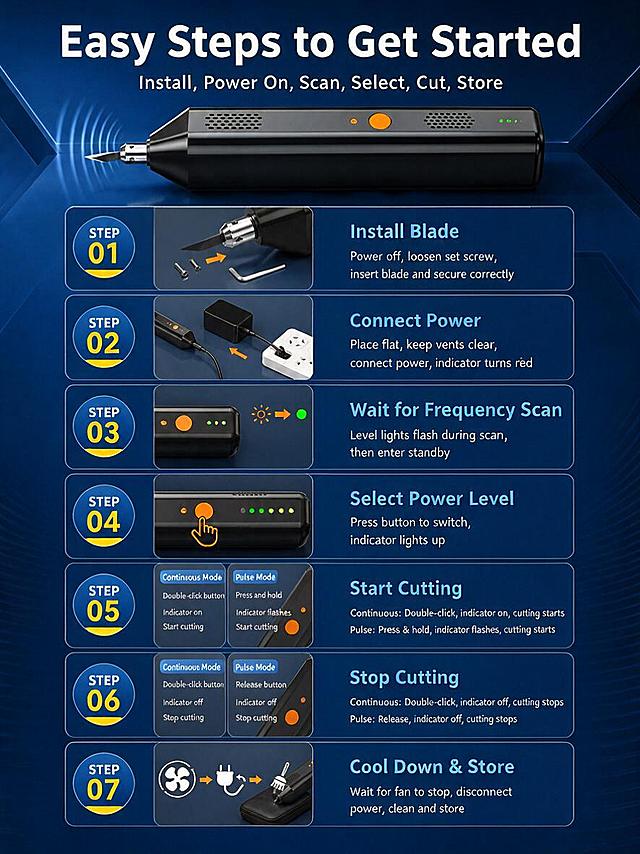

![[详情页-2] 核心性能详情页,核心任务:详细讲解40kHz高频切割性能与技术参数。严格锁定产品形状与尺寸。
[统一视觉] 套系策略:风格=工业科技风、精密专业感、五金器械商业摄影;标题字=粗黑体、厚重有力;正文字=无衬线体、清晰易读;主色=深蓝(#0A2463)+银灰(#C0C5CE);背景延展=深蓝渐变底+细微科技网格纹理;强调色=亮蓝色(#3E92CC);标题色=白色;正文色=浅银灰色;组件=圆角深蓝信息卡片、参数数据块、细银灰分隔线;光影=顶部柔光+金属高光+体积光。
[画面] 产品使用【图1】换能器主机,图生图严格保留产品真实外观、结构、材质、颜色、形状和尺寸比例。主体位置:画面右侧,换能器侧视角度。主体占比约40%。左侧为详细性能参数和技术说明区。背景:深蓝色渐变工业科技背景。
[文字] 左上主标题:"Core Performance"(白色大粗体)。副标题:"40kHz High Frequency Precision Cutting"(亮蓝色中等字)。左侧参数区,4个参数卡片竖排:
"Resonant Frequency" + "40kHz"
"Resonant Impedance" + "≤80Ω"
"Capacitance" + "0.7μF ±20%"
"Model" + "HSK03-150604-40K-2P2.0L50"
下方技术说明:
"• Stable output under long-time operation"
"• High energy conversion efficiency"
"• Consistent cutting quality"
"• Low heat generation during work"
所有文字英文,横向排版,手机端可读。
[规格] 图片比例3:4竖版,4K,产品形状尺寸严格与原图一致,避免变形、错字、中文文字、绝对化用词。](https://gd-cms.dancf.com/gd-cms/xi19e5/0/9f35bd34-d7cb-4a2d-ad6e-c4a03e77015e25104.jpeg?x-oss-process=image/resize,w_640,type_6/sharpen,120/interlace,1)
![[主图-5] 多场景适配主图,核心任务:展示超声波切割刀的多场景通用性。严格锁定产品形状与尺寸。
[统一基调] 风格=工业科技风、精密专业感、五金器械商业摄影;主色=深蓝(#0A2463)+银灰(#C0C5CE);背景=深蓝渐变+科技网格线+淡蓝色光晕;标题字=粗黑体、厚重有力;标题色=白色;辅助字色=浅银灰色;强调色=亮蓝色(#3E92CC);组件=圆角深蓝信息卡片、场景图标、细银灰分隔线;光影=顶部柔光+金属高光+体积光。
[画面] 产品使用【图1】超声波切割刀换能器,图生图严格保留产品真实外观、结构、材质、颜色、形状和尺寸比例。主体位置:画面中央偏上,换能器主机保持原图比例。主体占比约35%。下方4宫格场景图,每个格子展示一个应用场景的示意图标+场景名称:塑料切割、织物切割、橡胶切割、食品切割。背景:深蓝色渐变工业科技背景。
[光影质感] 商业棚拍级光影,金属质感真实,场景图标简洁明了,整体层次分明。
[配色] 主色深蓝+银灰,强调色亮蓝用于场景图标和标签,背景深蓝渐变,文字白色+浅银灰。
[文字版式] 顶部主标题:"Versatile for
Multiple Materials"(白色大粗体,分两行)。副标题:"Wide Range of Cutting Applications"(亮蓝色中等字)。下方4宫格,每格有图标+英文标签:
🔹 "Plastic & Acrylic" + "Clean edge cutting"
🔹 "Fabric & Textile" + "Sealed edge no fray"
🔹 "Rubber & Silicone" + "Precise burr-free cut"
🔹 "Food & Packaging" + "Hygienic smooth cut"
底部小字:"3 blade types for different material needs"。所有文字为英文,横向排版。
[输出要求] 比例1:1方形,2K分辨率,产品形状尺寸严格与原图一致,避免变形、错字、中文文字、绝对化用词。](https://gd-cms.dancf.com/gd-cms/xi19e5/0/b29ccf1e-1c7a-4cfd-86e7-6a1b053a67d225650.jpeg?x-oss-process=image/resize,w_640,type_6/sharpen,120/interlace,1)