已添加
登录/注册
把右下角文字去掉
把右下角文字去掉
69ab8iexkgS...
2025.12.17
做同款
基于原图,将电动扳手、电池和所有配件上所有的黄色装饰部分修改为深湖蓝色,保持产品主体结构、黑色配件、金属配件、文字内容和纯白背景完全不变,只修改黄色部分颜色,保持金属质感和光影效果,修改自然不突兀,整体效果真实清晰。
用户zyfbxFyi
把产品银色部分变成黑色,其他不变
小小小小小雷同学
严格还原上传的产品图中产品细节,比例保持1:1;欧美工业极简高级风格,浅灰色渐变背景,杂志级精致排版,高清 2K 画质。画面上半部分展示黑色铝合金螺丝刀头吸附银色批头的动态悬浮场景,用淡蓝色磁力线特效突出 N42 强磁效果;下半部分左右分栏,左栏特写黑色收纳盒内的卡位槽卡住批头的细节、配红色箭头指向卡位结构,右栏展示手持倒置收纳盒、批纹丝不动的场景。标题用粗体无衬线英文放在画面上方‘DUAL LOCK SYSTEM’,副标题用细体深灰色字分两行放在标题下方‘Strong Magnetic Adsorption | Precision Slot Anti-Loose’,整体风格硬朗专业。
GD966782696
我要做一组电钻电商宣传图,请帮我生成 3 张图片方案:1 张功能卖点图、1 张使用场景图、1 张细节特写图。要求真实产品摄影风格,突出强劲动力、无线便携、多功能使用,适合电商平台展示。图片文字英文
1r5dl4gjf1cuWbGg-HB
[第4屏] Structure and Material Analysis of Impact Wrench. 本屏使用【图1】标注产品核心结构细节。 [氛围/风格] 专业解析风格,浅蓝渐变低饱和背景,清晰标注突出结构优势,工业科技质感。 [元素布局] 产品主体居中展示,使用红色框标注三个核心部位:输出轴、电机舱、锂电池包,每个标注区域添加文字说明;保留产品原外观、颜色、比例与输入图完全一致。 [光影质感] 正面柔光均匀打亮,标注区域轻微提亮,整体清晰度高,结构展示清楚。 [配色色系] 全局底色 #E8EDF2,主色浅蓝渐变,辅助色红色标注框,黑色说明文字。 [视角构图] 正面平视,产品主体占据画面60%,标注分布在产品四周,布局舒朗不拥挤。 [文字版式] 顶部主标题「Premium Structure & Material」,每个标注框配马来文说明:「Aloi Keluli Output Shaft」「Motor Tan Brush Kecekapan Tinggi」「Bateri Lithium 4.0Ah」,文字清晰易读。 [比例分辨率] 9:16竖版比例,4K分辨率,文字清晰可辨,高清画质,马来文输出。 [负向提示词] 结构标注错误,产品变形,文字错乱,中文字符,颜色偏差。
GD550392596
[第3屏] 核心结构解析页,引线标注吸尘器关键部件,本屏使用【图1】作为商品主体 [氛围/风格] 专业解析,清晰直观,简约科技风 [元素布局] 吸尘器整体居中,用细引线引出四个核心部位:智能AI芯片控制区、高密度过滤器、电池保护模块、多功能接口,每个引线旁标注功能说明。浅灰渐变背景,保持产品外观结构与原图完全一致 [光影质感] 均匀柔光照明,产品结构清晰,引线标注明确,整体明暗层次自然 [配色色系] 全局底色 #f0f2f5,引线蓝色,标注文字黑色,产品保持原有黑红配色 [视角构图] 正面平视,产品完整展示,标注布局合理不遮挡主体 [文字版式] 顶部大标题 «Структура и ключевые компоненты», 每个引线标注 «Умный чип ИИ», «Высокоплотный фильтр», «Защита батареи», «Многофункциональные насадки», 俄语清晰标注,字体大小适中 [比例分辨率] 97:30 横版,宽度2048高度635,4K分辨率,高清画质 [负向提示词] 变形,水印,文字错乱,结构错误,中文字符
67kctxae9-HB
[第3张] 亚马逊跨境电商详情页结构材质拆解 - DELIXI Multi-Angle Screwdriver Set 金属批头与棘轮结构细节特写。本张使用【图1】作为产品参考,重点展示万向弯折头款的关节结构和批头细节。 [氛围/风格] 工业精密风,微距特写质感,突出金属材质与精密结构,跨境电商专业感,商业摄影级画质。 [元素布局] 画面左侧为万向弯折头螺丝刀的关节部位放大特写,占比约50%,清晰展示金属转轴、铆钉、金色调节环的精密结构;右侧上下分布两个细节小图:上方为批头尖端微距特写展示合金钢材质,下方为手柄防滑纹理特写;背景为深炭灰色,有微弱的径向光效从产品中心向外发散。 [光影质感] 侧逆光勾勒金属边缘高光,正面柔光补亮细节,金属表面有细腻的拉丝纹理反光,关节缝隙处有自然阴影,突出立体感和精密感。 [配色色系] 全局底色 #1E2024 深炭灰;主色为金属银灰与产品红;辅助色金色调节环点缀、白色标注线。 [视角构图] 左侧大特写为主视觉,右侧双小图辅助说明,阅读动线从左至右、从上至下。 [文字版式] 全英文文案,无任何中文字符。顶部主标题 "Built to Last",白色加粗大字;副标题 "Premium Materials & Precision Engineering",浅灰色小字。左侧大图标注线指向关节处,标注文字 "360° Pivot Head";右上小图标注 "S2 Alloy Steel Bit";右下小图标注 "Non-slip TPR Handle"。标注线为细白线,文字为白色无衬线字体,清晰可读。底部横排三个材质标签:"S2 Steel Bits"、"Chrome Vanadium Shaft"、"TPR Non-slip Grip"。 [比例分辨率] 9:16 竖版比例,4K分辨率,文字清晰锐利,高清画质。 [负向提示词] 产品变形,结构错误,金属质感差,中文字符,水印,文字错乱,文字过小,颜色偏差,背景杂乱。
GD550392596
产品细节图,特写展示这套手工工具的刀刃、手柄、刀头的工艺细节,使用西班牙语标注,风格统一清晰专业
1q0gvt6dx2hce05m-HB
1:1正方形比例,美式工业极简风格,杂志级精致排版。严格还原产品细节:橙色手柄的防滑凹槽纹理、金属杆直径3.8mm、银色批头长度25mm。画面主体为特写镜头:一只白人女性的手握着橙色螺丝刀手柄,刀杆头部正吸起一枚银色批头,下方还有两枚不同规格的批头悬浮在空中发光,清晰展示强磁吸附效果。背景为纯白色,打侧光突出金属质感和磁吸动态。主标题“BUILT-IN STRONG MAGNET”为大号无衬线粗体亮橙色字,放在左上角,副标题“Easy Bit Insertion & Screw Holding”为中号无衬线黑色字位于主标题下方,右下角小字“No More Lost Screws!”为灰色,排版左重右轻,视觉焦点集中在磁吸部位,动态感强。
GD966782696
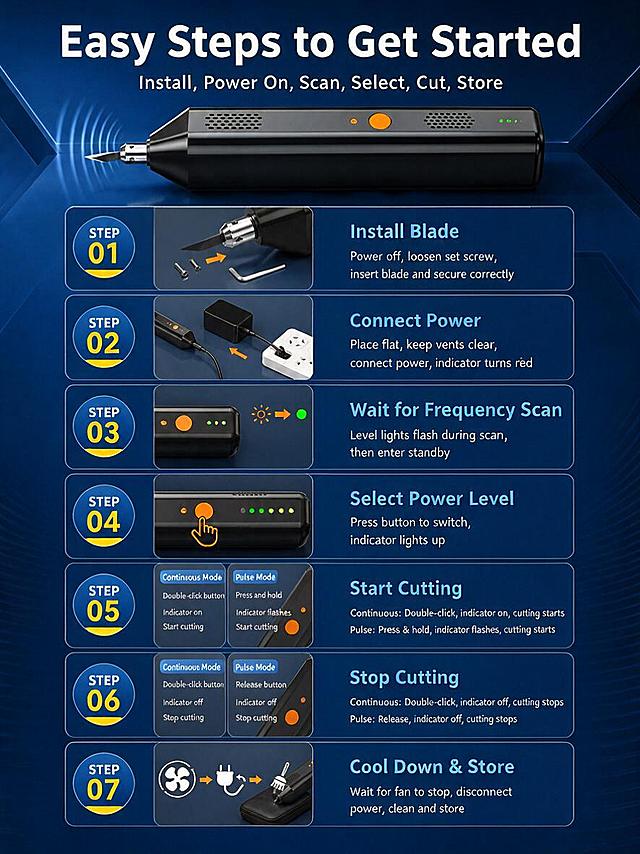
Strictly follow the layout, composition, product shape, all 7 step panels with illustrations, background style and color of the reference image. Only replace all Chinese text with English. Product and all step illustrations must remain exactly the same. Text replacements: - 使用步骤 简单易上手 → Easy Steps to Get Started - 安装 通电 扫频 选档 切割 收纳 → Install, Power On, Scan, Select, Cut, Store - 安装刀片 → Install Blade - 断电拧松顶紧螺丝 装入刀片并按方向要求固定 → Power off, loosen set screw, insert blade and secure correctly - 连接电源 → Connect Power - 放平主机 保持散热孔无遮挡 连接原装电源 电源指示灯亮红灯 → Place flat, keep vents clear, connect power, indicator turns red - 等待扫频 → Wait for Frequency Scan - 档位灯闪烁开始扫频 熄灭后进入待机状态 → Level lights flash during scan, then enter standby - 选择档位 → Select Power Level - 点按按键切换档位 对应档位指示灯亮 → Press button to switch, indicator lights up - 开始切割 → Start Cutting - 连续模式 双击按键 工作指示灯亮 开始切割 → Continuous: Double-click, indicator on, cutting starts - 点动模式 按住按键 工作指示灯闪烁 开始切割 → Pulse: Press & hold, indicator flashes, cutting starts - 连续模式 → Continuous Mode - 点动模式 → Pulse Mode - 双击按键 → Double-click button - 按住按键 → Press and hold - 工作指示灯亮 → Indicator on - 工作指示灯闪烁 → Indicator flashes - 开始切割 → Start cutting - 停止切割 → Stop Cutting - 连续模式 双击按键 工作指示灯熄灭 停止切割 → Continuous: Double-click, indicator off, cutting stops - 点动模式 松开按键 工作指示灯熄灭 停止切割 → Pulse: Release, indicator off, cutting stops - 松开按键 → Release button - 工作指示灯熄灭 → Indicator off - 停止切割 → Stop cutting - 冷却收纳 → Cool Down & Store - 停止后待风扇停止转动 再断电 清理收纳 → Wait for fan to stop, disconnect power, clean and store All text in English. Same font style, same colors, same positions. Product and all illustrations unchanged.
1q8f2y3osk-HB
Strictly follow the layout, composition, product shape, all 7 step panels with illustrations, background style and color of the reference image. Only replace all Chinese text with English. Product and all step illustrations must remain exactly the same. Text replacements: - 使用步骤 简单易上手 → Easy Steps to Get Started - 安装 通电 扫频 选档 切割 收纳 → Install, Power On, Scan, Select, Cut, Store - 安装刀片 → Install Blade - 断电拧松顶紧螺丝 装入刀片并按方向要求固定 → Power off, loosen set screw, insert blade and secure correctly - 连接电源 → Connect Power - 放平主机 保持散热孔无遮挡 连接原装电源 电源指示灯亮红灯 → Place flat, keep vents clear, connect power, indicator turns red - 等待扫频 → Wait for Frequency Scan - 档位灯闪烁开始扫频 熄灭后进入待机状态 → Level lights flash during scan, then enter standby - 选择档位 → Select Power Level - 点按按键切换档位 对应档位指示灯亮 → Press button to switch, indicator lights up - 开始切割 → Start Cutting - 连续模式 双击按键 工作指示灯亮 开始切割 → Continuous: Double-click, indicator on, cutting starts - 点动模式 按住按键 工作指示灯闪烁 开始切割 → Pulse: Press & hold, indicator flashes, cutting starts - 连续模式 → Continuous Mode - 点动模式 → Pulse Mode - 双击按键 → Double-click button - 按住按键 → Press and hold - 工作指示灯亮 → Indicator on - 工作指示灯闪烁 → Indicator flashes - 开始切割 → Start cutting - 停止切割 → Stop Cutting - 连续模式 双击按键 工作指示灯熄灭 停止切割 → Continuous: Double-click, indicator off, cutting stops - 点动模式 松开按键 工作指示灯熄灭 停止切割 → Pulse: Release, indicator off, cutting stops - 松开按键 → Release button - 工作指示灯熄灭 → Indicator off - 停止切割 → Stop cutting - 冷却收纳 → Cool Down & Store - 停止后待风扇停止转动 再断电 清理收纳 → Wait for fan to stop, disconnect power, clean and store All text in English. Same font style, same colors, same positions. Product and all illustrations unchanged.
1q8f2y3osk-HB
Amazon e-commerce main image for 3D printing pen, 1:1 square ratio, plug-in powered version feature, light blue 3D printing pen with USB cable plugged in, placed on modern minimalist white and yellow geometric platform, blue gradient background, professional product photography, soft lighting, with English text "Plug-in Powered Design" and "No Battery Worries, Create Freely for Hours", all text in English, clean and tech-style, suitable for Amazon cross-border platform
1r45eznk6nLt2KKQ-HB
[第4屏] 结构材质解析页-可伸缩螺丝刀材质与结构拆解。本屏使用【图1】作为主体,红框标注关键部位。 [氛围/风格] 专业工业解析风,清晰结构展示,真实质感。 [元素布局] 产品斜跨画面中心占比约70%,三个红圈放大框分别标注防滑握柄、磁性批头、可伸缩节三个关键部位,每个放大框对应材质说明文字。保留产品原有结构、颜色和比例完全一致。 [光影质感] 侧光突出产品纹理和金属质感,红框高亮标注,对比清晰。 [配色色系] 全局底色 #f0f0f0;主色产品黑蓝色;辅助色红色标注框,深灰文字。 [视角构图] 斜侧视角,中心产品,四周分布放大标注,结构清晰。 [文字版式] 顶部主标题「Premium Material & Structure」,每个标注框旁配马来文材质说明,文字清晰不遮挡主体结构。 [比例分辨率] 9:16 竖版比例,4K分辨率,文字清晰可辨,高清画质。 [负向提示词] 结构错误,标注错乱,产品变形,颜色偏差,文字模糊,中文字符
GD550392596
Strictly follow the layout, composition, all product shapes, all accessory shapes, background style and color of the reference image. Only replace all Chinese text with English. All products and accessories must remain exactly the same shape and position. Text replacements: - 双供电模式自由切换 → Dual Power Supply · Freely Switchable - 彻底解决续航焦虑 → No More Battery Anxiety - 65W电源适配器 → 65W Power Adapter - 输出 5V/9V/15V-3A → Output 5V/9V/15V-3A - 支持快充 → Fast Charging Supported - 双口6A-1.5米电源线 → Dual-End 6A 1.5m Power Cable - Type-C接口 → Type-C Connector - 65W充电宝 → 65W Power Bank - 输出 5V/9V/15V-3A → Output 5V/9V/15V-3A - 支持快充 → Fast Charging Supported - 户外便携 → Portable for Outdoor Use - 耗材无忧 → Worry-Free Consumables - 满足多场景使用需求 → Meets Multi-Scenario Usage Needs - 内六角扳手 (工具钢发黑) → Hex Wrench (Blackened Tool Steel) - 顶紧螺丝 (12.9级M4*4平端) → Set Screw (Grade 12.9 M4×4 Flat End) - 刀夹耗材 (航空铝材质) → Blade Holder (Aviation Aluminum) - 10片装刀片套件 → 10-Piece Blade Set - 多种适配刀片 → Various Compatible Blades - 硅胶刀头防护套 → Silicone Blade Protector All text in English. Same bold sans-serif font, same colors, same positions. All products and accessories unchanged.
1q8f2y3osk-HB
Strictly follow the layout, composition, all product shapes, all accessory shapes, background style and color of the reference image. Only replace all Chinese text with English. All products and accessories must remain exactly the same shape and position. Text replacements: - 双供电模式自由切换 → Dual Power Supply · Freely Switchable - 彻底解决续航焦虑 → No More Battery Anxiety - 65W电源适配器 → 65W Power Adapter - 输出 5V/9V/15V-3A → Output 5V/9V/15V-3A - 支持快充 → Fast Charging Supported - 双口6A-1.5米电源线 → Dual-End 6A 1.5m Power Cable - Type-C接口 → Type-C Connector - 65W充电宝 → 65W Power Bank - 输出 5V/9V/15V-3A → Output 5V/9V/15V-3A - 支持快充 → Fast Charging Supported - 户外便携 → Portable for Outdoor Use - 耗材无忧 → Worry-Free Consumables - 满足多场景使用需求 → Meets Multi-Scenario Usage Needs - 内六角扳手 (工具钢发黑) → Hex Wrench (Blackened Tool Steel) - 顶紧螺丝 (12.9级M4*4平端) → Set Screw (Grade 12.9 M4×4 Flat End) - 刀夹耗材 (航空铝材质) → Blade Holder (Aviation Aluminum) - 10片装刀片套件 → 10-Piece Blade Set - 多种适配刀片 → Various Compatible Blades - 硅胶刀头防护套 → Silicone Blade Protector All text in English. Same bold sans-serif font, same colors, same positions. All products and accessories unchanged.
1q8f2y3osk-HB
[第5屏] 充电方式演示-Type-C便捷充电展示。基于用户提供的尾盖充电口图和产品拆分图生成,保持接口结构和产品颜色不变。 [氛围/风格] 使用场景展示,明亮清晰,真实自然,浅蓝水底岩石场景。 [元素布局] 画面上方展示拧开后的手电筒尾部,Type-C充电口特写清晰可见,一条黑色Type-C数据线已经插入充电口。手电筒主体斜放在深色岩石台面上,头部放在一侧。画面左上角文字说明区域,右上角放置尾盖接口放大特写图。保持产品黑色筒身、红色O型圈的颜色不变,展示两个备用红色O型圈在筒身位置。 [光影质感] 自然环境光,岩石背景柔和,产品金属和橡胶材质对比清晰,充电口结构清晰可见,整体光线均匀,产品清晰突出。 [配色色系] 全局底色:#E6F3F8(浅亮蓝);岩石背景:#505A5C(深灰);产品:#1A1A1A+#DC3800;文字:#111111(黑色)。 [视角构图] 平视略微俯视视角,自然场景构图,产品占据画面下半部分和中心位置,文字放在左上区域。 [文字版式] 左上角主标题 "Convenient Type-C Charging",黑色加粗。副标题 "Unscrew The Tail To Charge",黑色常规字体。下方文字说明 "Universal USB-C interface, easy to charge with power bank, car charger or laptop",排版简洁。右上角特写图标注 "Built-in USB-C Port"。 [比例分辨率] 1:1正方形比例,1024x1024像素,2k分辨率,文字清晰可辨,超高清。 [负向提示词] 接口变形,数据线扭曲,文字错乱,颜色偏差,背景杂乱,黑暗背景
GD497332791
2K分辨率1:1比例,美式工业极简风格,明亮干净的渐变浅灰色背景,主标题超大亮黄色粗体字居中顶部写"GET YOURS TODAY",副标题白色中号字在主标题下方写"Essential Tool for Every Home";画面中心展示全套12合1螺丝刀产品的精美组合图,底部添加一个亮黄色的圆角矩形按钮,按钮内用黑色粗体字写着"SHOP NOW";简洁有力的CTA设计,专业产品摄影打光,突出金属质感与色彩对比
GD966782696
Hand holding spot welder welding battery connecting nickel sheet, spot welding application scenario, eye-catching bright style, the product is battery connection nickel sheet, all text with only the first letter capitalized
1qzmvw6mh1VxddlA-HB
[第1屏] 详情页头图-21V Cordless Impact Wrench professional power tool advertisement. 本屏使用【图1】作为商品主体。 [氛围/风格] 专业工业工具风格,深色低饱和背景,强光突出金属质感,真实客观商业摄影质感。 [元素布局] 电动扳手居中放置,占画面约65%,保留产品原外观、结构、颜色、品牌标识与输入图一致;背景使用渐变深灰色,添加微弱金属纹理点缀,底部预留信息条位置。 [光影质感] 左侧主光打亮机身,右侧辅助柔化光影,机身金属部件保留清晰高光,底部自然投影,整体明暗层次分明,产品轮廓清晰。 [配色色系] 全局底色 #2A2A2E,主色深灰渐变;辅助色红色点缀产品按键,白色作为标题文字。 [视角构图] 45度斜侧视角,产品为绝对视觉中心,阅读动线从上到下,顶部标题 → 中部产品 → 底部信息。 [文字版式] 顶部主标题「Cordless Impact Wrench」,副标题「High Torque For Your Projects」,白色加粗字体居中对齐;底部信息条标注「21V Lithium Battery」,文字清晰不遮挡主体。 [比例分辨率] 9:16竖版比例,4K分辨率,文字清晰可辨,高清画质,马来文输出。 [负向提示词] 产品变形,缺件错件,颜色偏差,品牌文字错乱,水印,中文字符,背景杂乱。
GD550392596
Amazon listing infographic style main image 3 - material and detail close-up. Dark charcoal gray background with subtle gradient. Main visual: close-up of the green ergonomic screwdriver handle with silver metal chuck, positioned at 45-degree angle, product occupies about 55% of frame. Keep handle appearance, green color, textured grip pattern, silver chuck exactly consistent with input image. Top left has bold title 'Ergonomic Design & Premium Material' in white. Three callout lines with labels point to different parts: 1) line to green handle grip area with label 'Non-slip TPR Handle - Comfortable Grip', 2) line to silver chuck with label 'Precision Magnetic Chuck - Secure Bit Locking', 3) line to bit tip with label 'CR-V Steel Bits - High Hardness & Wear Resistant'. Bottom right has a small inset circular window showing a macro close-up of screwdriver bit tip texture. Bottom bar with 3 small icons: hardness icon, anti-slip icon, anti-rust icon. Professional technical illustration style, dramatic side lighting highlighting metal texture and grip pattern. All text in English. Color palette: dark charcoal background, white text, green accent matching handle, silver highlights. 1:1 square ratio. Negative prompts: deformation, Chinese text, watermarks, blurry details, cheap plastic look
GD550392596
[第4张] 配件全家福+参数规格页(§15产品信息收尾)。本张使用【图1】全套配件作为主体,参考【图5】的滤网细节展示。 [氛围/风格] 产品参数信息页,浅灰蓝背景,清晰规整,跨境电商专业风格。 [元素布局] 画面左半部分为全套配件全家福整齐排列:高压洗车枪主机、68V锂电池、金属进水管、快速接头、两种喷嘴(红色直喷、白色扇形)、加长喷杆、泡沫壶、金属滤网过滤器、充电器;右半部分为参数规格表格区;所有配件外观、颜色、结构与输入图完全一致。 [光影质感] 顶部柔光均匀照明,配件下方有自然投影,整体干净明亮,突出产品质感。 [配色色系] 全局底色 #E8ECF1 浅灰蓝;主色黑色产品+金色金属件;辅助色深灰文字+蓝色标题。 [视角构图] 左半部分俯视角度展示全家福配件,右半部分参数表左右构图,阅读动线从左到右。 [文字版式] 顶部标题 "What You Get & Specifications",加粗居中;左半部分配件下方有细线标注各配件名称;右半部分参数表两列:左侧规格项 "Battery Voltage"、"Battery Capacity"、"Max Pressure"、"Water Flow"、"Charging Time"、"Filter Type";右侧对应数值 "68V"、"30000mAh"、"High Pressure"、"Adjustable"、"Fast Charge"、"Metal Fine Filter";右下角小字 "Package Includes Complete Accessories";所有文字为英文,清晰规整。 [比例分辨率] 1:1 方图比例,4K分辨率,文字清晰可辨,高清画质。 [负向提示词] 配件缺失,结构错误,颜色偏差,水印,文字错乱,中文字符,产品模糊,排版混乱。
GD937157838
[第4张] Amazon product detail page — Specifications and application scenarios for DELIXI Go-Through Screwdriver Set. This image uses [image1] as product reference, keeping product appearance consistent. [Atmosphere/Style] Clean professional Amazon spec page, minimalist hardware catalog style, informative and trustworthy. [Element Layout] Top section shows three application scenario thumbnails horizontally: (1) Home Repair — screwdriver on a wooden workbench with household items, (2) Automotive — screwdriver near a car engine bay, (3) Electrical Work — screwdriver with electrical panel components. Middle section has both screwdrivers (Phillips and slotted) standing vertically with dimension callout lines (total length, shaft length, handle length). Bottom section has a clean specification table with product details. Background is white to very light gray gradient, clean and bright for spec readability. [Lighting] Bright even lighting, shadowless for spec table, soft natural light in scenario thumbnails, overall clean and well-lit. [Color Palette] Global background #FFFFFF to #F5F5F5 white gradient; accent color red (#D32F2F) for headers and highlights; text in dark gray (#333333) and medium gray; product colors: red handle, silver steel. [Composition] Vertical portrait, three horizontal sections: top scenarios (30%), middle product with dimensions (35%), bottom spec table (35%). Reading flow: top scenarios → middle product dimensions → bottom specs. [Text Layout] All text in English, no Chinese characters. Top section title: "Versatile for Every Task" in bold dark gray. Three scenario thumbnails each have a label below: "Home & DIY", "Automotive Repair", "Electrical Work". Middle section: dimension lines with measurements in both inches and mm (e.g., "6 inch / 150mm shaft", "Total 9.5 inch / 240mm"). Bottom spec table with two columns, left column labels, right column values: "Brand: DELIXI ELECTRIC", "Type: Go-Through Screwdriver Set", "Tips Included: Phillips + Slotted", "Material: Chrome-Vanadium Steel", "Handle: Non-Slip Rubber", "Feature: Strike Cap, Magnetic Tip". Table header row in red with white text "Product Specifications". [Negative Prompt] Chinese text, blurry specs, watermark, messy layout, wrong product colors, deformed shape, text too small to read, table unreadable
GD550392596
[第4张] Amazon product detail page — Specifications and application scenarios for DELIXI Go-Through Screwdriver Set. This image uses [image1] as product reference, keeping product appearance consistent. [Atmosphere/Style] Clean professional Amazon spec page, minimalist hardware catalog style, informative and trustworthy. [Element Layout] Top section shows three application scenario thumbnails horizontally: (1) Home Repair — screwdriver on a wooden workbench with household items, (2) Automotive — screwdriver near a car engine bay, (3) Electrical Work — screwdriver with electrical panel components. Middle section has both screwdrivers (Phillips and slotted) standing vertically with dimension callout lines (total length, shaft length, handle length). Bottom section has a clean specification table with product details. Background is white to very light gray gradient, clean and bright for spec readability. [Lighting] Bright even lighting, shadowless for spec table, soft natural light in scenario thumbnails, overall clean and well-lit. [Color Palette] Global background #FFFFFF to #F5F5F5 white gradient; accent color red (#D32F2F) for headers and highlights; text in dark gray (#333333) and medium gray; product colors: red handle, silver steel. [Composition] Vertical portrait, three horizontal sections: top scenarios (30%), middle product with dimensions (35%), bottom spec table (35%). Reading flow: top scenarios → middle product dimensions → bottom specs. [Text Layout] All text in English, no Chinese characters. Top section title: "Versatile for Every Task" in bold dark gray. Three scenario thumbnails each have a label below: "Home & DIY", "Automotive Repair", "Electrical Work". Middle section: dimension lines with measurements in both inches and mm (e.g., "6 inch / 150mm shaft", "Total 9.5 inch / 240mm"). Bottom spec table with two columns, left column labels, right column values: "Brand: DELIXI ELECTRIC", "Type: Go-Through Screwdriver Set", "Tips Included: Phillips + Slotted", "Material: Chrome-Vanadium Steel", "Handle: Non-Slip Rubber", "Feature: Strike Cap, Magnetic Tip". Table header row in red with white text "Product Specifications". [Negative Prompt] Chinese text, blurry specs, watermark, messy layout, wrong product colors, deformed shape, text too small to read, table unreadable
GD550392596
「图片1」,参照原图和标题ROTARY BURR TUNGSTEN STEEL CARBIDE DOUBLE CUT TUNGSTEN STEEL METAL MILLING CUTTER,生成5张风格统一英文电商详情图,包括主图,多角度实拍图,细节特写图,安装 / 适配说明图,卖点 / 规格图,主图比例为1:1「图片1」
1r2t8v3s6t5TQHZQ-HB
strictly restore the product in the uploaded images, including packaging design, colors, all details, product size: 12cm×6.6cm×2.5cm, high-quality studio product shot of the 21-in-1 precision screwdriver set on a clean bright white background, centered composition, product takes up 70% of the frame, main title in bold orange sans-serif text at the top: "21-IN-1 PRECISION SCREWDRIVER SET", subtitle in small black sans-serif text below the title: "All Your Repair Needs, In One Tiny Kit", minimalist magazine-style layout, high contrast, industrial modern aesthetic, sharp focus, 4K resolution, soft even lighting, no clutter, eye-catching for US DIY audience
用户XrqxSnwj





![[第4屏] Structure and Material Analysis of Impact Wrench. 本屏使用【图1】标注产品核心结构细节。
[氛围/风格] 专业解析风格,浅蓝渐变低饱和背景,清晰标注突出结构优势,工业科技质感。
[元素布局] 产品主体居中展示,使用红色框标注三个核心部位:输出轴、电机舱、锂电池包,每个标注区域添加文字说明;保留产品原外观、颜色、比例与输入图完全一致。
[光影质感] 正面柔光均匀打亮,标注区域轻微提亮,整体清晰度高,结构展示清楚。
[配色色系] 全局底色 #E8EDF2,主色浅蓝渐变,辅助色红色标注框,黑色说明文字。
[视角构图] 正面平视,产品主体占据画面60%,标注分布在产品四周,布局舒朗不拥挤。
[文字版式] 顶部主标题「Premium Structure & Material」,每个标注框配马来文说明:「Aloi Keluli Output Shaft」「Motor Tan Brush Kecekapan Tinggi」「Bateri Lithium 4.0Ah」,文字清晰易读。
[比例分辨率] 9:16竖版比例,4K分辨率,文字清晰可辨,高清画质,马来文输出。
[负向提示词] 结构标注错误,产品变形,文字错乱,中文字符,颜色偏差。](https://gd-cms.dancf.com/gd-cms/xi19e5/0/68ef849f-36ca-42d9-b8b9-37aeed7683803096.png?x-oss-process=image/resize,w_640,type_6/sharpen,120/interlace,1)
![[第3屏] 核心结构解析页,引线标注吸尘器关键部件,本屏使用【图1】作为商品主体
[氛围/风格] 专业解析,清晰直观,简约科技风
[元素布局] 吸尘器整体居中,用细引线引出四个核心部位:智能AI芯片控制区、高密度过滤器、电池保护模块、多功能接口,每个引线旁标注功能说明。浅灰渐变背景,保持产品外观结构与原图完全一致
[光影质感] 均匀柔光照明,产品结构清晰,引线标注明确,整体明暗层次自然
[配色色系] 全局底色 #f0f2f5,引线蓝色,标注文字黑色,产品保持原有黑红配色
[视角构图] 正面平视,产品完整展示,标注布局合理不遮挡主体
[文字版式] 顶部大标题 «Структура и ключевые компоненты», 每个引线标注 «Умный чип ИИ», «Высокоплотный фильтр», «Защита батареи», «Многофункциональные насадки», 俄语清晰标注,字体大小适中
[比例分辨率] 97:30 横版,宽度2048高度635,4K分辨率,高清画质
[负向提示词] 变形,水印,文字错乱,结构错误,中文字符](https://gd-cms.dancf.com/gd-cms/xi19e5/0/eda4d4a7-7dd4-4d71-9de4-6e7bff70638e71221.jpeg?x-oss-process=image/resize,w_640,type_6/sharpen,120/interlace,1)
![[第3张] 亚马逊跨境电商详情页结构材质拆解 - DELIXI Multi-Angle Screwdriver Set 金属批头与棘轮结构细节特写。本张使用【图1】作为产品参考,重点展示万向弯折头款的关节结构和批头细节。
[氛围/风格] 工业精密风,微距特写质感,突出金属材质与精密结构,跨境电商专业感,商业摄影级画质。
[元素布局] 画面左侧为万向弯折头螺丝刀的关节部位放大特写,占比约50%,清晰展示金属转轴、铆钉、金色调节环的精密结构;右侧上下分布两个细节小图:上方为批头尖端微距特写展示合金钢材质,下方为手柄防滑纹理特写;背景为深炭灰色,有微弱的径向光效从产品中心向外发散。
[光影质感] 侧逆光勾勒金属边缘高光,正面柔光补亮细节,金属表面有细腻的拉丝纹理反光,关节缝隙处有自然阴影,突出立体感和精密感。
[配色色系] 全局底色 #1E2024 深炭灰;主色为金属银灰与产品红;辅助色金色调节环点缀、白色标注线。
[视角构图] 左侧大特写为主视觉,右侧双小图辅助说明,阅读动线从左至右、从上至下。
[文字版式] 全英文文案,无任何中文字符。顶部主标题 "Built to Last",白色加粗大字;副标题 "Premium Materials & Precision Engineering",浅灰色小字。左侧大图标注线指向关节处,标注文字 "360° Pivot Head";右上小图标注 "S2 Alloy Steel Bit";右下小图标注 "Non-slip TPR Handle"。标注线为细白线,文字为白色无衬线字体,清晰可读。底部横排三个材质标签:"S2 Steel Bits"、"Chrome Vanadium Shaft"、"TPR Non-slip Grip"。
[比例分辨率] 9:16 竖版比例,4K分辨率,文字清晰锐利,高清画质。
[负向提示词] 产品变形,结构错误,金属质感差,中文字符,水印,文字错乱,文字过小,颜色偏差,背景杂乱。](https://gd-cms.dancf.com/gd-cms/xi19e5/0/4efde0c6-1e1e-4da9-9dd3-fb44f3eab12412505.png?x-oss-process=image/resize,w_640,type_6/sharpen,120/interlace,1)





![[第4屏] 结构材质解析页-可伸缩螺丝刀材质与结构拆解。本屏使用【图1】作为主体,红框标注关键部位。
[氛围/风格] 专业工业解析风,清晰结构展示,真实质感。
[元素布局] 产品斜跨画面中心占比约70%,三个红圈放大框分别标注防滑握柄、磁性批头、可伸缩节三个关键部位,每个放大框对应材质说明文字。保留产品原有结构、颜色和比例完全一致。
[光影质感] 侧光突出产品纹理和金属质感,红框高亮标注,对比清晰。
[配色色系] 全局底色 #f0f0f0;主色产品黑蓝色;辅助色红色标注框,深灰文字。
[视角构图] 斜侧视角,中心产品,四周分布放大标注,结构清晰。
[文字版式] 顶部主标题「Premium Material & Structure」,每个标注框旁配马来文材质说明,文字清晰不遮挡主体结构。
[比例分辨率] 9:16 竖版比例,4K分辨率,文字清晰可辨,高清画质。
[负向提示词] 结构错误,标注错乱,产品变形,颜色偏差,文字模糊,中文字符](https://gd-cms.dancf.com/gd-cms/xi19e5/0/a2079518-8e6d-4d3d-b3e3-2d7c8e5caadb7266.jpeg?x-oss-process=image/resize,w_640,type_6/sharpen,120/interlace,1)


![[第5屏] 充电方式演示-Type-C便捷充电展示。基于用户提供的尾盖充电口图和产品拆分图生成,保持接口结构和产品颜色不变。
[氛围/风格] 使用场景展示,明亮清晰,真实自然,浅蓝水底岩石场景。
[元素布局] 画面上方展示拧开后的手电筒尾部,Type-C充电口特写清晰可见,一条黑色Type-C数据线已经插入充电口。手电筒主体斜放在深色岩石台面上,头部放在一侧。画面左上角文字说明区域,右上角放置尾盖接口放大特写图。保持产品黑色筒身、红色O型圈的颜色不变,展示两个备用红色O型圈在筒身位置。
[光影质感] 自然环境光,岩石背景柔和,产品金属和橡胶材质对比清晰,充电口结构清晰可见,整体光线均匀,产品清晰突出。
[配色色系] 全局底色:#E6F3F8(浅亮蓝);岩石背景:#505A5C(深灰);产品:#1A1A1A+#DC3800;文字:#111111(黑色)。
[视角构图] 平视略微俯视视角,自然场景构图,产品占据画面下半部分和中心位置,文字放在左上区域。
[文字版式] 左上角主标题 "Convenient Type-C Charging",黑色加粗。副标题 "Unscrew The Tail To Charge",黑色常规字体。下方文字说明 "Universal USB-C interface, easy to charge with power bank, car charger or laptop",排版简洁。右上角特写图标注 "Built-in USB-C Port"。
[比例分辨率] 1:1正方形比例,1024x1024像素,2k分辨率,文字清晰可辨,超高清。
[负向提示词] 接口变形,数据线扭曲,文字错乱,颜色偏差,背景杂乱,黑暗背景](https://gd-cms.dancf.com/gd-cms/xi19e5/0/66d14a69-c498-4f7d-b9a5-35b3ec2523ac2495.png?x-oss-process=image/resize,w_640,type_6/sharpen,120/interlace,1)



![[第1屏] 详情页头图-21V Cordless Impact Wrench professional power tool advertisement. 本屏使用【图1】作为商品主体。
[氛围/风格] 专业工业工具风格,深色低饱和背景,强光突出金属质感,真实客观商业摄影质感。
[元素布局] 电动扳手居中放置,占画面约65%,保留产品原外观、结构、颜色、品牌标识与输入图一致;背景使用渐变深灰色,添加微弱金属纹理点缀,底部预留信息条位置。
[光影质感] 左侧主光打亮机身,右侧辅助柔化光影,机身金属部件保留清晰高光,底部自然投影,整体明暗层次分明,产品轮廓清晰。
[配色色系] 全局底色 #2A2A2E,主色深灰渐变;辅助色红色点缀产品按键,白色作为标题文字。
[视角构图] 45度斜侧视角,产品为绝对视觉中心,阅读动线从上到下,顶部标题 → 中部产品 → 底部信息。
[文字版式] 顶部主标题「Cordless Impact Wrench」,副标题「High Torque For Your Projects」,白色加粗字体居中对齐;底部信息条标注「21V Lithium Battery」,文字清晰不遮挡主体。
[比例分辨率] 9:16竖版比例,4K分辨率,文字清晰可辨,高清画质,马来文输出。
[负向提示词] 产品变形,缺件错件,颜色偏差,品牌文字错乱,水印,中文字符,背景杂乱。](https://gd-cms.dancf.com/gd-cms/xi19e5/0/b6727ea9-5f6d-4614-8130-02cb34b28d1a3118.jpeg?x-oss-process=image/resize,w_640,type_6/sharpen,120/interlace,1)

![[第4张] 配件全家福+参数规格页(§15产品信息收尾)。本张使用【图1】全套配件作为主体,参考【图5】的滤网细节展示。
[氛围/风格] 产品参数信息页,浅灰蓝背景,清晰规整,跨境电商专业风格。
[元素布局] 画面左半部分为全套配件全家福整齐排列:高压洗车枪主机、68V锂电池、金属进水管、快速接头、两种喷嘴(红色直喷、白色扇形)、加长喷杆、泡沫壶、金属滤网过滤器、充电器;右半部分为参数规格表格区;所有配件外观、颜色、结构与输入图完全一致。
[光影质感] 顶部柔光均匀照明,配件下方有自然投影,整体干净明亮,突出产品质感。
[配色色系] 全局底色 #E8ECF1 浅灰蓝;主色黑色产品+金色金属件;辅助色深灰文字+蓝色标题。
[视角构图] 左半部分俯视角度展示全家福配件,右半部分参数表左右构图,阅读动线从左到右。
[文字版式] 顶部标题 "What You Get & Specifications",加粗居中;左半部分配件下方有细线标注各配件名称;右半部分参数表两列:左侧规格项 "Battery Voltage"、"Battery Capacity"、"Max Pressure"、"Water Flow"、"Charging Time"、"Filter Type";右侧对应数值 "68V"、"30000mAh"、"High Pressure"、"Adjustable"、"Fast Charge"、"Metal Fine Filter";右下角小字 "Package Includes Complete Accessories";所有文字为英文,清晰规整。
[比例分辨率] 1:1 方图比例,4K分辨率,文字清晰可辨,高清画质。
[负向提示词] 配件缺失,结构错误,颜色偏差,水印,文字错乱,中文字符,产品模糊,排版混乱。](https://gd-cms.dancf.com/gd-cms/xi19e5/0/f6b84a96-5941-4a28-9705-c680ae793aee13045.png?x-oss-process=image/resize,w_640,type_6/sharpen,120/interlace,1)

![[第4张] Amazon product detail page — Specifications and application scenarios for DELIXI Go-Through Screwdriver Set. This image uses [image1] as product reference, keeping product appearance consistent.
[Atmosphere/Style] Clean professional Amazon spec page, minimalist hardware catalog style, informative and trustworthy.
[Element Layout] Top section shows three application scenario thumbnails horizontally: (1) Home Repair — screwdriver on a wooden workbench with household items, (2) Automotive — screwdriver near a car engine bay, (3) Electrical Work — screwdriver with electrical panel components. Middle section has both screwdrivers (Phillips and slotted) standing vertically with dimension callout lines (total length, shaft length, handle length). Bottom section has a clean specification table with product details. Background is white to very light gray gradient, clean and bright for spec readability.
[Lighting] Bright even lighting, shadowless for spec table, soft natural light in scenario thumbnails, overall clean and well-lit.
[Color Palette] Global background #FFFFFF to #F5F5F5 white gradient; accent color red (#D32F2F) for headers and highlights; text in dark gray (#333333) and medium gray; product colors: red handle, silver steel.
[Composition] Vertical portrait, three horizontal sections: top scenarios (30%), middle product with dimensions (35%), bottom spec table (35%). Reading flow: top scenarios → middle product dimensions → bottom specs.
[Text Layout] All text in English, no Chinese characters. Top section title: "Versatile for Every Task" in bold dark gray. Three scenario thumbnails each have a label below: "Home & DIY", "Automotive Repair", "Electrical Work". Middle section: dimension lines with measurements in both inches and mm (e.g., "6 inch / 150mm shaft", "Total 9.5 inch / 240mm"). Bottom spec table with two columns, left column labels, right column values: "Brand: DELIXI ELECTRIC", "Type: Go-Through Screwdriver Set", "Tips Included: Phillips + Slotted", "Material: Chrome-Vanadium Steel", "Handle: Non-Slip Rubber", "Feature: Strike Cap, Magnetic Tip". Table header row in red with white text "Product Specifications".
[Negative Prompt] Chinese text, blurry specs, watermark, messy layout, wrong product colors, deformed shape, text too small to read, table unreadable](https://gd-cms.dancf.com/gd-cms/xi19e5/0/e1554a3b-21b3-49c5-a2e3-006ca12827a812431.png?x-oss-process=image/resize,w_640,type_6/sharpen,120/interlace,1)
![[第4张] Amazon product detail page — Specifications and application scenarios for DELIXI Go-Through Screwdriver Set. This image uses [image1] as product reference, keeping product appearance consistent.
[Atmosphere/Style] Clean professional Amazon spec page, minimalist hardware catalog style, informative and trustworthy.
[Element Layout] Top section shows three application scenario thumbnails horizontally: (1) Home Repair — screwdriver on a wooden workbench with household items, (2) Automotive — screwdriver near a car engine bay, (3) Electrical Work — screwdriver with electrical panel components. Middle section has both screwdrivers (Phillips and slotted) standing vertically with dimension callout lines (total length, shaft length, handle length). Bottom section has a clean specification table with product details. Background is white to very light gray gradient, clean and bright for spec readability.
[Lighting] Bright even lighting, shadowless for spec table, soft natural light in scenario thumbnails, overall clean and well-lit.
[Color Palette] Global background #FFFFFF to #F5F5F5 white gradient; accent color red (#D32F2F) for headers and highlights; text in dark gray (#333333) and medium gray; product colors: red handle, silver steel.
[Composition] Vertical portrait, three horizontal sections: top scenarios (30%), middle product with dimensions (35%), bottom spec table (35%). Reading flow: top scenarios → middle product dimensions → bottom specs.
[Text Layout] All text in English, no Chinese characters. Top section title: "Versatile for Every Task" in bold dark gray. Three scenario thumbnails each have a label below: "Home & DIY", "Automotive Repair", "Electrical Work". Middle section: dimension lines with measurements in both inches and mm (e.g., "6 inch / 150mm shaft", "Total 9.5 inch / 240mm"). Bottom spec table with two columns, left column labels, right column values: "Brand: DELIXI ELECTRIC", "Type: Go-Through Screwdriver Set", "Tips Included: Phillips + Slotted", "Material: Chrome-Vanadium Steel", "Handle: Non-Slip Rubber", "Feature: Strike Cap, Magnetic Tip". Table header row in red with white text "Product Specifications".
[Negative Prompt] Chinese text, blurry specs, watermark, messy layout, wrong product colors, deformed shape, text too small to read, table unreadable](https://gd-cms.dancf.com/gd-cms/xi19e5/0/85c1b365-535f-48a6-814d-f9f8bc421fb012669.png?x-oss-process=image/resize,w_640,type_6/sharpen,120/interlace,1)