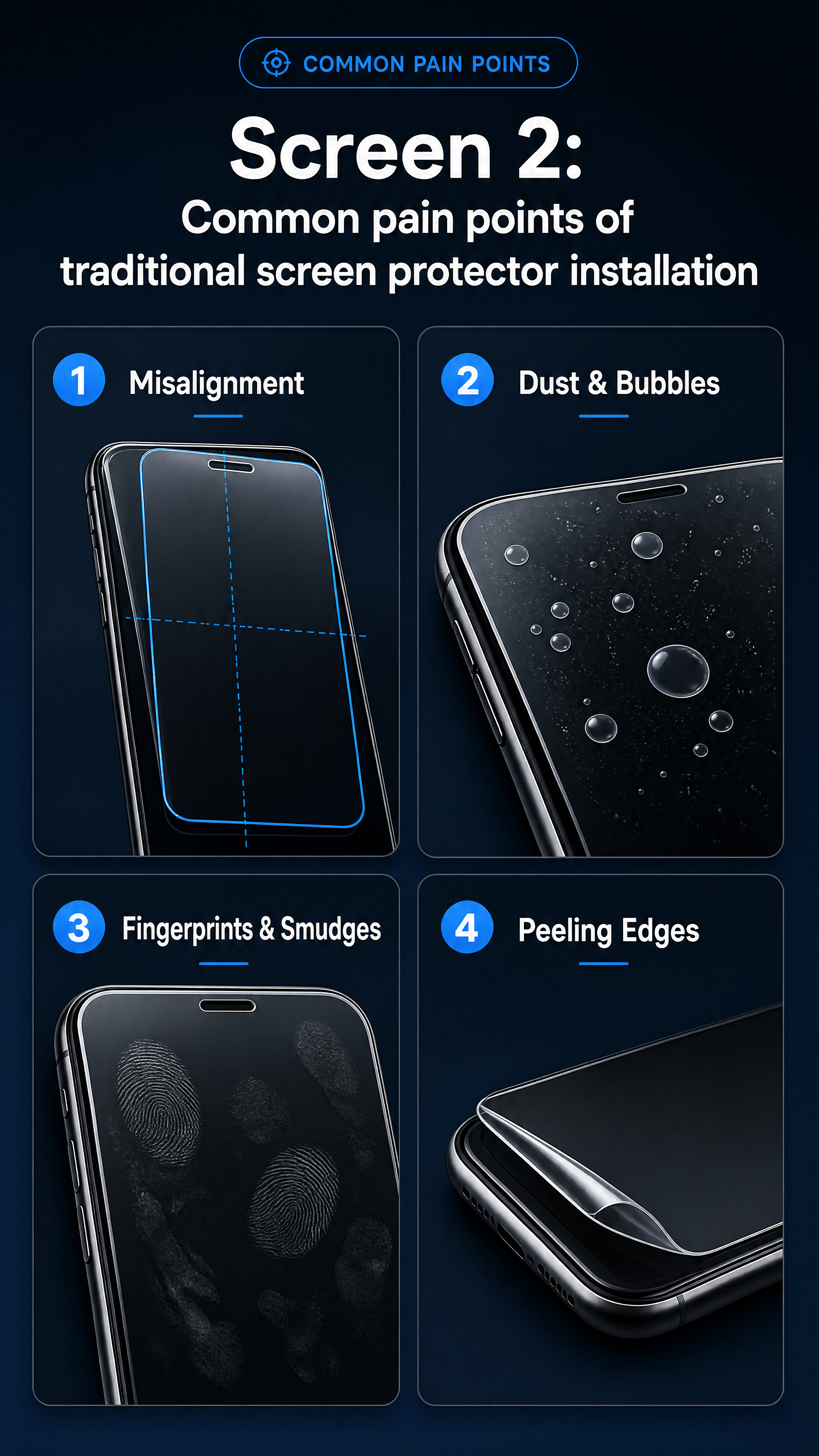
[Screen 2] Common pain points of traditional screen protector installation. 2x2 card layout with 4 c
GD271412801



![[Screen 10] Tempered glass feature showcase: high definition, anti-fingerprint, scratch resistant. Show finished effect after application on iPhone. All text in English, 9:16 vertical, 4K resolution. Negative prompt: blurry, color distortion, Chinese characters](https://gd-cms.dancf.com/gd-cms/xi19e5/0/6cefddee-fef3-4578-835a-38fdbcd568cf10943.png?x-oss-process=image/resize,w_640,type_6/sharpen,120/interlace,1)
![[Screen 7: Installation Steps] Uses [Image 1] shows three full installation steps. 3 grid vertical layout, each grid one step. 1: Step One - Place Alignment Cover on phone](https://gd-cms.dancf.com/gd-cms/xi19e5/0/72e75627-5fad-44d9-9f61-728df7231f4311022.png?x-oss-process=image/resize,w_640,type_6/sharpen,120/interlace,1)
![[Screen 1] Automatic Dust-Free Tempered Glass Screen Protector for iPhone main header. Keep product structure consistent with image 1. Simple professional cross-border style. 9:16 vertical, 4K resolution. All text in English. Negative prompt: deformation, blurry text, Chinese characters, watermark](https://gd-cms.dancf.com/gd-cms/xi19e5/0/2e126474-58c2-4e02-8a7f-faca3bdbb67010942.png?x-oss-process=image/resize,w_640,type_6/sharpen,120/interlace,1)
![[Screen 10: Protection Performance] Shows anti-drop, anti-explosion performance test. Left: steel ball drop test, right: scratch resistance test. Split screen contrast, clear result. Dark blue BG, test result labels. Top title: "Effective Protection Durable Use". Labels: 9H Hardness Anti-Explosion, Anti-Scratch No Fragments, all English. 9:16, 4K. Negative: Chinese characters, blurry test, watermark.](https://gd-cms.dancf.com/gd-cms/xi19e5/0/262435b2-0211-40b5-bb5a-0faf5a326ea311014.png?x-oss-process=image/resize,w_640,type_6/sharpen,120/interlace,1)




![[Screen 9: Detail & Material] Close-up macro of tempered film key details. Uses [Image 1] for product reference. Macro shot shows: 9H hardness edge, oleophobic coating surface, high transparency. Three sections vertical, each section macro close-up with label. Dark tech BG, highlights the material texture. Top title: "Premium Material Exquisite Details". Labels: 9H Anti-Scratch, Oleophobic Anti-Fingerprint, High Transmittance Clear Vision, all English. Keep material texture and product shape consistent with input. 9:16, 4K. Negative: Chinese characters, deformed detail, blurry macro, watermark.](https://gd-cms.dancf.com/gd-cms/xi19e5/0/a5f45ea0-ae27-4d2d-812a-9c4e1872020311141.png?x-oss-process=image/resize,w_640,type_6/sharpen,120/interlace,1)

![[Screen 1: Main Visual] This screen uses [Image 1] as product main body, keep structure, material, color same as input. It is header for iPhone dust-free compartment tempered glass screen protector cross-border detail page. Title: "Automatic Alignment Dust-Free Tempered Glass Screen Protector". Dark sci-tech style, professional objective, simple layout, commercial photography. Product in center, takes 65% area. Top for title, bottom two core selling points with blue luminous labels. Deep dark blue background with subtle light lines. Left top soft main light, natural bottom right projection, clear edges. Global BG: #121826, product transparent, accent #348eda blue + white text. Front slightly elevated angle, centered. Top center title, 12% screen width, white bold. Bottom selling points: "One Cover One Pull", "No Bubbles Automatic Installation", blue labels, no cover product. 9:16, 4K, all English, clear text. Negative: deformed product, missing parts, Chinese characters, blurry text, watermark.](https://gd-cms.dancf.com/gd-cms/xi19e5/0/56cdb4e8-7fa4-4b91-9f44-b794fa123d8410736.png?x-oss-process=image/resize,w_640,type_6/sharpen,120/interlace,1)
![[Screen 4] Step by step function demonstration page, showing how to use the cleaning kit to clean different electronic ports. This screen uses [image1] product.
[Atmosphere/Style] Step-by-step tutorial style, clear and intuitive, realistic operation demonstration.
[Element Layout] The screen is divided into three equal horizontal sections, each section shows one cleaning step. Step 1: Use the large brush to clean the surface; Step 2: Use the fine brush to clean inside the port (use the hand holding brush scene from [image1]); Step 3: Install dust plugs to keep clean. Each step has a small title, and the product of this step is displayed in the section. All products match the structure and color of [image1].
[Light and Shadow Texture] Consistent soft lighting for all three steps, each step has clear visual focus.
[Color Scheme] Global background color #f0f2f5, each step card uses light white background, consistent with the overall system style.
[Perspective Composition] Three steps arranged horizontally, each is independent, top overall title.
[Text Layout] Top overall title "Three Simple Steps To Clean Your Device", each step title is "Step one: Surface Sweep", "Step two: Deep Clean", "Step three: Dust Protection", all text in English, clear font, each step's text is placed on the top of the section.
[Proportional Resolution] 97:30 horizontal ratio, 4K resolution, text is clear and recognizable.
[Negative Prompt] Wrong step order, deformed products, text confusion, Chinese characters, unreasonable hand posture, watermark.](https://gd-cms.dancf.com/gd-cms/xi19e5/0/e3d01856-8745-4861-b6a6-9fae598e61d341123.png?x-oss-process=image/resize,w_640,type_6/sharpen,120/interlace,1)

![[Screen 9] Material and detail close-up page. Show details of the tempered glass and dust-free bin structure. Keep product details consistent with image 1. All text in English, 9:16 vertical, 4K resolution. Negative prompt: deformation, blurry details, Chinese characters](https://gd-cms.dancf.com/gd-cms/xi19e5/0/944c394d-02f7-4b11-8d12-67950b35f15f10924.png?x-oss-process=image/resize,w_640,type_6/sharpen,120/interlace,1)
![[Screen 6: Before After Comparison] Compare traditional vs this dust-free screen protector. Split screen comparison style, clear visual difference. Left is traditional application: bubbles, dust, crooked. Right is this product: flat, clean, perfect alignment. Each half has clear product placement and label. Light gray BG, left red warning corner label, right green check label. Top title: "Comparison Result: Clear Difference". Labels: Traditional Way, Our Automatic Dust-Free, all English. 9:16, 4K. Negative: Chinese characters, unclear comparison, blurry text, watermark.](https://gd-cms.dancf.com/gd-cms/xi19e5/0/5d358833-4742-496a-9560-ef8f3c31b72611013.png?x-oss-process=image/resize,w_640,type_6/sharpen,120/interlace,1)


![[Screen 3: Core Selling Points Overview] Uses [Image 1] as product reference, shows four core selling points for iPhone dust-free tempered film. Professional sci-tech style, layered cards, simple clear. Top main title, middle four cards 2x2 matrix, each card has icon + title + description, product on right, keep structure same as input. BG #121826 deep dark blue, card BG #1e293b, text white, accent #348eda blue. Top title: "Core Advantages Of Automatic Dust-Free Installation". Cards: 1. Automatic Alignment - Precision no adjust, 2. One Pull Remove Dust - Electrostatic belt full absorption, 3. Auto Bubble Exhaust - No bubbles left, 4. HD Clear - High transmittance sensitive touch. All English, clear. 9:16, 4K. Negative: Chinese characters, deformed product, blurry text, watermark.](https://gd-cms.dancf.com/gd-cms/xi19e5/0/27043a70-88d2-473e-a1a2-55afefacd86f11023.png?x-oss-process=image/resize,w_640,type_6/sharpen,120/interlace,1)
![[Screen 12: Product Information] Final product information parameter page. Left shows overall product picture, right has parameter table and package content. Uses [Image 1] as product picture, keep consistent. Top title: "Product Information". Parameters: Material: Tempered Glass, Features: Automatic Alignment Dust-Free, Package: 1 x Screen Protector + 1 x Dust-Free Alignment Kit. Keep information clear and organized. Light gray BG, product left, parameter right, all English. 9:16, 4K. Negative: Chinese characters, blurry parameters, deformed product, watermark.](https://gd-cms.dancf.com/gd-cms/xi19e5/0/8aa16ebe-f6dd-4c4f-9769-d45b49f644cf11010.png?x-oss-process=image/resize,w_640,type_6/sharpen,120/interlace,1)


![[第2屏] 痛点直击屏,手机膜常见使用痛点场景汇总,不包含产品主体图。
[氛围/风格] 写实生活化场景,柔和光影,简约图文排版,清晰直观传递困扰。
[元素布局] 整屏分四个痛点模块,每个模块配小场景示意图+痛点文字,页面顶部大标题区,内容分区留白舒朗,不拥挤。四个痛点分别是:1. 日常静电吸灰,屏幕沾满灰尘;2. 容易刮花留痕,影响触摸手感;3. 边缘翘边不服帖,贴合度差;4. 指纹残留严重,屏幕留油影响观感。
[光影质感] 整体均匀柔光,文字和示意图清晰,明暗对比适中,易读性强。
[配色色系] 全局底色 #121217,延续首屏深色科技风,主文字白色,痛点标识用浅金色高亮,模块分割用浅灰色细线条,配色和首屏统一。
[视角构图] 从上到下通屏排版,阅读动线自然从上到下逐点阅读,标题在上,痛点内容依次排布。
[文字版式] 顶部大标题「贴膜总踩坑?这些问题我们解决」,每个痛点模块配8字以内痛点短句,文字清晰,字号适配手机端,不拥挤不遮挡示意图。
[比例分辨率] 宽度1080px,高度1920px,9:16 竖版比例,4K分辨率,文字清晰可辨,高清画质。
[负向提示词] 文字过小,文字错乱,排版拥挤,色彩突兀,水印,虚假宣传内容。](https://gd-cms.dancf.com/gd-cms/xi19e5/0/9fe4f63c-d2ed-4b1f-80fc-1de84823b69716419.jpeg?x-oss-process=image/resize,w_640,type_6/sharpen,120/interlace,1)




![[第3屏] AliExpress详情页第三屏 - Core features overview for NFC e-ink phone case. [氛围/风格] Modern tech style, clean information layout, clear hierarchy. [元素布局] Six core feature cards arranged in two columns and three rows, on a light blue gradient background. Each card has an icon at top, feature title in middle, and benefit description below. Keep cards evenly spaced, breathing room between each card. The six features are: 1. NFC Wireless Transfer, One tap projection from phone app; 2. DIY Custom Display, Upload any photo you like; 3. 3-Color Standard Screen, Clear eye-friendly display; 4. No Battery Required, Zero power consumption; 5. Metal Lens Protection, Precise cutout full protection; 6. Drop-Proof Design, Durable rugged structure. [光影质感] Even soft lighting, text and icons clear, contrast between background and cards is comfortable. [配色系] Global background #f0f5fa (light blue gradient), cards white background, icons use blue matching phone case, text dark gray. [视角构图] Vertical full screen, grid layout clean and organized. [文字版式] Top centered title "Core Advantages At A Glance", bold, all English. Each card title bold, description smaller regular weight, all clear and readable, no Chinese characters. [比例分辨率] 3:4 vertical ratio, 4K resolution, ultra HD. [负向提示词] deformation, watermark, text confusion, Chinese characters, extreme words, messy layout, overlapping elements.](https://gd-cms.dancf.com/gd-cms/xi19e5/0/7ea0d341-3502-437d-a066-9d0cb49660f52313.png?x-oss-process=image/resize,w_640,type_6/sharpen,120/interlace,1)