
创意预览图

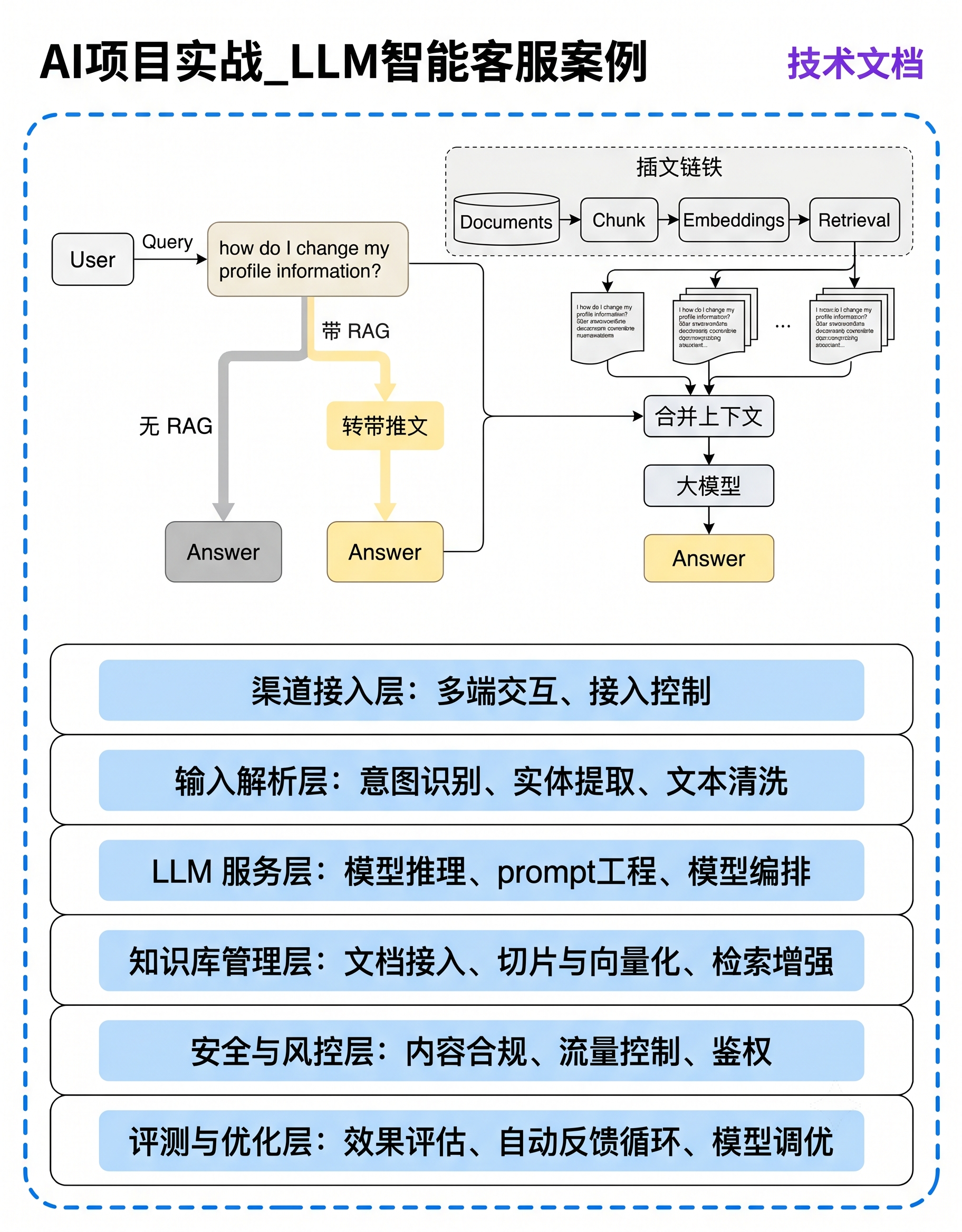
1242×1600px竖版AI项目LLM智能客服技术架构图,纯白背景蓝色虚线圆角外框。分上下两区:顶部黑粗标题"AI项目实战_LLM智能客服案例",右侧紫字"技术文档"。上区RAG流程:左侧User模

用户头像

1r3x60wydth...

2026.06.25
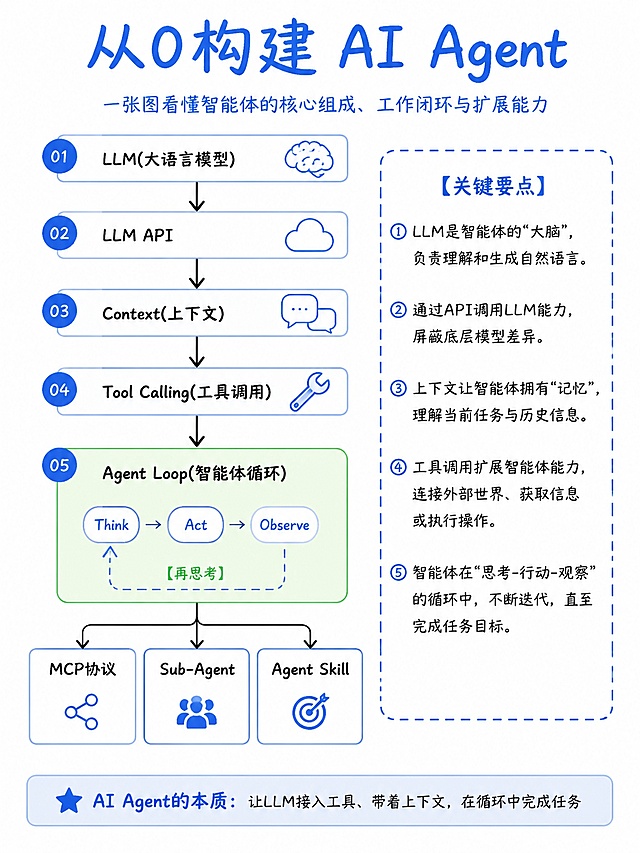
3:4竖版纯白背景极简手绘风技术流程图,顶部标题"从0构建 AI Agent"蓝色粗体,下方小字副标题"一张图看懂智能体的核心组成、工作闭环与扩展能力"。左侧带蓝色圆圈序号01-05,从上到下纵向流程:01:大脑图标 + LLM(大语言模型),右侧文字"负责理解、推理与生成";02:API图标 + LLM API,右侧文字"厂商通过HTTP提供调用能力";03:对话气泡图标 + Context(上下文),右侧文字"客户端维护对话历史与当前状态";04:扳手图标 + Tool Calling(工具调用),右侧文字"告诉LLM它有哪些工具可用";05:绿色方框Agent Loop(智能体循环),内部绿色循环图:Think(思考)→Act(行动)→Observe(观察)→再思考,右侧文字"让模型从“会回答”走向“会执行”"。Agent Loop下方横向分支:1. 插座图标 + MCP协议,下方文字"标准化工具对接";2. 双人图标 + Sub-Agent,下方文字"多智能体分工协作";3. 书本图标 + Agent Skill,下方文字"可复用流程封装"。右侧关键要点虚线框:标题"关键要点",内5条文字:① Agent不等于单个模型,而是模型 + 上下文 + 工具 + 循环。② LLM提供大脑,API提供接入方式。③ Context决定模型此刻“看见了什么”。④ Tool Calling让模型具备调用外部能力的入口。⑤ MCP、Sub-Agent、Skill分别解决接入、协作、复用。底部蓝色横幅框,左侧五角星图标,文字"AI Agent的本质:让LLM接入工具、带着上下文,在循环中完成任务。",其中"让LLM接入工具、带着上下文,在循环中完成任务"加蓝色下划线。整体风格:简约手绘线框、蓝色主色调、绿色Agent Loop配色、无多余装饰。3:4竖版纯白背景极简手绘风技术流程图,顶部标题"从0构建 AI Agent"蓝色粗体,下方小字副标题"一张图看懂智能体的核心组成、工作闭环与扩展能力"。左侧带蓝色圆圈序号01-05,从上到下纵向流程:01:大脑图标 + LLM(大语言模型),右侧文字"负责理解、推理与生成";02:API图标 + LLM API,右侧文字"厂商通过HTTP提供调用能力";03:对话气泡图标 + Context(上下文),右侧文字"客户端维护对话历史与当前状态";04:扳手图标 + Tool Calling(工具调用),右侧文字"告诉LLM它有哪些工具可用";05:绿色方框Agent Loop(智能体循环),内部绿色循环图:Think(思考)→Act(行动)→Observe(观察)→再思考,右侧文字"让模型从“会回答”走向“会执行”"。Agent Loop下方横向分支:1. 插座图标 + MCP协议,下方文字"标准化工具对接";2. 双人图标 + Sub-Agent,下方文字"多智能体分工协作";3. 书本图标 + Agent Skill,下方文字"可复用流程封装"。右侧关键要点虚线框:标题"关键要点",内5条文字:① Agent不等于单个模型,而是模型 + 上下文 + 工具 + 循环。② LLM提供大脑,API提供接入方式。③ Context决定模型此刻“看见了什么”。④ Tool Calling让模型具备调用外部能力的入口。⑤ MCP、Sub-Agent、Skill分别解决接入、协作、复用。底部蓝色横幅框,左侧五角星图标,文字"AI Agent的本质:让LLM接入工具、带着上下文,在循环中完成任务。",其中"让LLM接入工具、带着上下文,在循环中完成任务"加蓝色下划线。整体风格:简约手绘线框、蓝色主色调、绿色Agent Loop配色、无多余装饰。
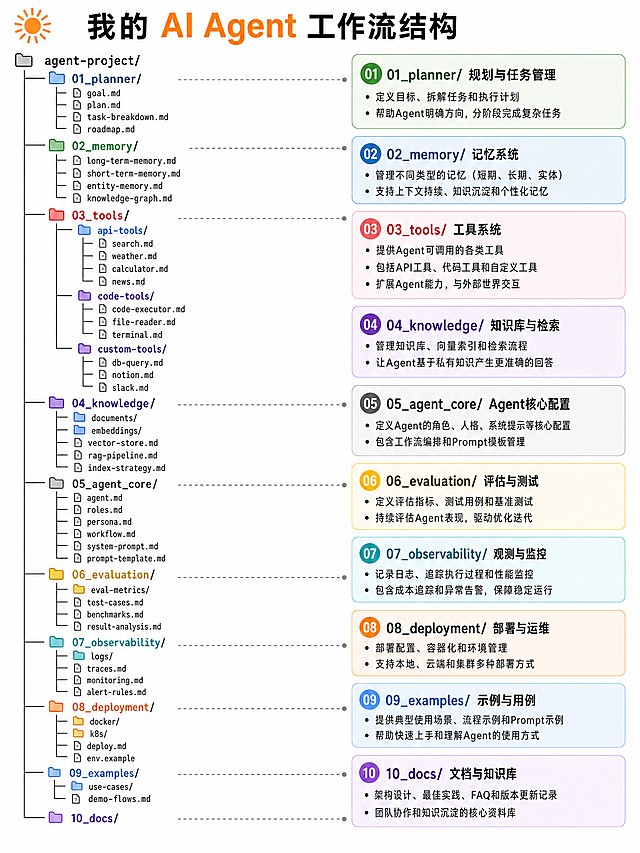
Generate a clean, professional directory structure infographic titled "我的 AI Agent 工作流结构", vertical layout, white background, 3:4 aspect ratio. Top left has an orange sunburst icon. Title text: "我的 AI Agent 工作流结构", with "AI Agent" in orange, other characters in black, bold font. The left side is a standard tree view folder structure with colored folder icons, the right side is a corresponding description column with colored rounded labels. All text is in Chinese, using a clear sans-serif font. Left tree structure (with colored folder icons): agent-project/ ├── 01_planner/ (blue folder) │ ├── goal.md │ ├── plan.md │ ├── task-breakdown.md │ └── roadmap.md ├── 02_memory/ (green folder) │ ├── long-term-memory.md │ ├── short-term-memory.md │ ├── entity-memory.md │ └── knowledge-graph.md ├── 03_tools/ (red folder) │ ├── api-tools/ (blue folder) │ │ ├── search.md │ │ ├── weather.md │ │ ├── calculator.md │ │ └── news.md │ ├── code-tools/ (purple folder) │ │ ├── code-executor.md │ │ ├── file-reader.md │ │ └── terminal.md │ └── custom-tools/ (purple folder) │ ├── db-query.md │ ├── notion.md │ └── slack.md ├── 04_knowledge/ (purple folder) │ ├── documents/ │ ├── embeddings/ │ ├── vector-store.md │ ├── rag-pipeline.md │ └── index-strategy.md ├── 05_agent_core/ (gray folder) │ ├── agent.md │ ├── roles.md │ ├── persona.md │ ├── workflow.md │ ├── system-prompt.md │ └── prompt-template.md ├── 06_evaluation/ (yellow folder) │ ├── eval-metrics/ │ ├── test-cases.md │ ├── benchmarks.md │ └── result-analysis.md ├── 07_observability/ (cyan folder) │ ├── logs/ │ ├── traces.md │ ├── monitoring.md │ └── alert-rules.md ├── 08_deployment/ (orange folder) │ ├── docker/ │ ├── k8s/ │ ├── deploy.md │ └── env.example ├── 09_examples/ (blue folder) │ ├── use-cases/ │ └── demo-flows.md └── 10_docs/ (purple folder) Right-side description labels (matching each section with pastel colors): - 01_planner/ (light green): 规划与任务管理 • 定义目标、拆解任务和执行计划 • 帮助Agent明确方向,分阶段完成复杂任务 - 02_memory/ (light blue): 记忆系统 • 管理不同类型的记忆(短期、长期、实体) • 支持上下文持续、知识沉淀和个性化记忆 - 03_tools/ (light pink): 工具系统 • 提供Agent可调用的各类工具 • 包括API工具、代码工具和自定义工具 • 扩展Agent能力,与外部世界交互 - 04_knowledge/ (light purple): 知识库与检索 • 管理知识库、向量索引和检索流程 • 让Agent基于私有知识产生更准确的回答 - 05_agent_core/ (light gray): Agent核心配置 • 定义Agent的角色、人格、系统提示等核心配置 • 包含工作流编排和Prompt模板管理 - 06_evaluation/ (light yellow): 评估与测试 • 定义评估指标、测试用例和基准测试 • 持续评估Agent表现,驱动优化迭代 - 07_observability/ (light cyan): 观测与监控 • 记录日志、追踪执行过程和性能监控 • 包含成本追踪和异常告警,保障稳定运行 - 08_deployment/ (light orange): 部署与运维 • 部署配置、容器化和环境管理 • 支持本地、云端和集群多种部署方式 - 09_examples/ (light blue): 示例与用例 • 提供典型使用场景、流程示例和Prompt示例 • 帮助快速上手和理解Agent的使用方式 - 10_docs/ (light purple): 文档与知识库 • 架构设计、最佳实践、FAQ和版本更新记录 • 团队协作和知识沉淀的核心资料库 Style requirements: - Use flat design, simple line icons for folders/files - Dashed gray guide lines connect each tree item to its description label.Generate a clean, professional directory structure infographic titled "我的 AI Agent 工作流结构", vertical layout, white background, 3:4 aspect ratio. Top left has an orange sunburst icon. Title text: "我的 AI Agent 工作流结构", with "AI Agent" in orange, other characters in black, bold font. The left side is a standard tree view folder structure with colored folder icons, the right side is a corresponding description column with colored rounded labels. All text is in Chinese, using a clear sans-serif font.

Left tree structure (with colored folder icons):
agent-project/
├── 01_planner/ (blue folder)
│   ├── goal.md
│   ├── plan.md
│   ├── task-breakdown.md
│   └── roadmap.md
├── 02_memory/ (green folder)
│   ├── long-term-memory.md
│   ├── short-term-memory.md
│   ├── entity-memory.md
│   └── knowledge-graph.md
├── 03_tools/ (red folder)
│   ├── api-tools/ (blue folder)
│   │   ├── search.md
│   │   ├── weather.md
│   │   ├── calculator.md
│   │   └── news.md
│   ├── code-tools/ (purple folder)
│   │   ├── code-executor.md
│   │   ├── file-reader.md
│   │   └── terminal.md
│   └── custom-tools/ (purple folder)
│       ├── db-query.md
│       ├── notion.md
│       └── slack.md
├── 04_knowledge/ (purple folder)
│   ├── documents/
│   ├── embeddings/
│   ├── vector-store.md
│   ├── rag-pipeline.md
│   └── index-strategy.md
├── 05_agent_core/ (gray folder)
│   ├── agent.md
│   ├── roles.md
│   ├── persona.md
│   ├── workflow.md
│   ├── system-prompt.md
│   └── prompt-template.md
├── 06_evaluation/ (yellow folder)
│   ├── eval-metrics/
│   ├── test-cases.md
│   ├── benchmarks.md
│   └── result-analysis.md
├── 07_observability/ (cyan folder)
│   ├── logs/
│   ├── traces.md
│   ├── monitoring.md
│   └── alert-rules.md
├── 08_deployment/ (orange folder)
│   ├── docker/
│   ├── k8s/
│   ├── deploy.md
│   └── env.example
├── 09_examples/ (blue folder)
│   ├── use-cases/
│   └── demo-flows.md
└── 10_docs/ (purple folder)

Right-side description labels (matching each section with pastel colors):
- 01_planner/ (light green): 规划与任务管理
  • 定义目标、拆解任务和执行计划
  • 帮助Agent明确方向,分阶段完成复杂任务
- 02_memory/ (light blue): 记忆系统
  • 管理不同类型的记忆(短期、长期、实体)
  • 支持上下文持续、知识沉淀和个性化记忆
- 03_tools/ (light pink): 工具系统
  • 提供Agent可调用的各类工具
  • 包括API工具、代码工具和自定义工具
  • 扩展Agent能力,与外部世界交互
- 04_knowledge/ (light purple): 知识库与检索
  • 管理知识库、向量索引和检索流程
  • 让Agent基于私有知识产生更准确的回答
- 05_agent_core/ (light gray): Agent核心配置
  • 定义Agent的角色、人格、系统提示等核心配置
  • 包含工作流编排和Prompt模板管理
- 06_evaluation/ (light yellow): 评估与测试
  • 定义评估指标、测试用例和基准测试
  • 持续评估Agent表现,驱动优化迭代
- 07_observability/ (light cyan): 观测与监控
  • 记录日志、追踪执行过程和性能监控
  • 包含成本追踪和异常告警,保障稳定运行
- 08_deployment/ (light orange): 部署与运维
  • 部署配置、容器化和环境管理
  • 支持本地、云端和集群多种部署方式
- 09_examples/ (light blue): 示例与用例
  • 提供典型使用场景、流程示例和Prompt示例
  • 帮助快速上手和理解Agent的使用方式
- 10_docs/ (light purple): 文档与知识库
  • 架构设计、最佳实践、FAQ和版本更新记录
  • 团队协作和知识沉淀的核心资料库

Style requirements:
- Use flat design, simple line icons for folders/files
- Dashed gray guide lines connect each tree item to its description label.
High-quality technical infographic titled "一张图看懂 AI Agent 全流程", subtitle "从用户提问到结果返回的 18 步拆解". 6-column vertical flow diagram layout on a white background. Pastel colored headers at the top and bottom for each column. Columns from left to right: 1. 用户 with light purple header and user icon, 2. 智能体(Agent) with orange header and robot icon, 3. 大模型(LLM) with light pink header and brain icon, 4. Skill with teal header and puzzle piece icon, 5. MCP with light blue header and chain link icon, 6. 工具 with light green header and wrench icon. Step-by-step flow with numbered orange/red rounded boxes connected by blue arrows. Steps: 1. 用户提问 (Query) → Agent接收请求 (2), 2. Agent接收请求 → 历史对话与上下文检索 (3), 3. 历史对话与上下文检索 → LLM意图识别与任务拆解 (4), 4. LLM意图识别与任务拆解 → 生成执行计划 (5), 5. 生成执行计划 → Agent接收执行计划 (6), 6. Agent接收执行计划 → 判断是否需要Skill / 工具 (7), 7. 判断是否需要Skill / 工具 → 匹配合适Skill (8), 8. 匹配合适Skill → Skill封装任务流程与参数模板 (9), 9. Skill封装任务流程与参数模板 → LLM补全调用参数 (10), 10. LLM补全调用参数 → Agent发送调用请求到MCP (11), 11. Agent发送调用请求到MCP → MCP工具发现与选择 (12), 12. MCP工具发现与选择 → MCP调用具体工具API (13), 13. MCP调用具体工具API → 工具执行具体任务 (14), 14. 工具执行具体任务 → MCP接收执行结果 (15), 15. MCP接收执行结果 → Agent整合Skill输出、工具结果与上下文 (16), 16. Agent整合Skill输出、工具结果与上下文 → LLM生成最终回答 (17), 17. LLM生成最终回答 → Agent向用户返回结果 (18). Add a green dashed box in the Skill column that contains the text explanation: "Skill: 可复用的能力模块,用来封装固定流程、提示词模板或领域能力。". All text uses clear sans-serif Chinese font, numbered steps use orange/red circles. Flat design style, no shadows, clean lines, all colors are matching pastel tones. Professional, technical and easy to read, suitable for learning materials. Aspect ratio 3:4 vertical layout.High-quality technical infographic titled "一张图看懂 AI Agent 全流程", subtitle "从用户提问到结果返回的 18 步拆解". 6-column vertical flow diagram layout on a white background. Pastel colored headers at the top and bottom for each column. Columns from left to right: 1. 用户 with light purple header and user icon, 2. 智能体(Agent) with orange header and robot icon, 3. 大模型(LLM) with light pink header and brain icon, 4. Skill with teal header and puzzle piece icon, 5. MCP with light blue header and chain link icon, 6. 工具 with light green header and wrench icon. Step-by-step flow with numbered orange/red rounded boxes connected by blue arrows. Steps: 1. 用户提问 (Query) → Agent接收请求 (2), 2. Agent接收请求 → 历史对话与上下文检索 (3), 3. 历史对话与上下文检索 → LLM意图识别与任务拆解 (4), 4. LLM意图识别与任务拆解 → 生成执行计划 (5), 5. 生成执行计划 → Agent接收执行计划 (6), 6. Agent接收执行计划 → 判断是否需要Skill / 工具 (7), 7. 判断是否需要Skill / 工具 → 匹配合适Skill (8), 8. 匹配合适Skill → Skill封装任务流程与参数模板 (9), 9. Skill封装任务流程与参数模板 → LLM补全调用参数 (10), 10. LLM补全调用参数 → Agent发送调用请求到MCP (11), 11. Agent发送调用请求到MCP → MCP工具发现与选择 (12), 12. MCP工具发现与选择 → MCP调用具体工具API (13), 13. MCP调用具体工具API → 工具执行具体任务 (14), 14. 工具执行具体任务 → MCP接收执行结果 (15), 15. MCP接收执行结果 → Agent整合Skill输出、工具结果与上下文 (16), 16. Agent整合Skill输出、工具结果与上下文 → LLM生成最终回答 (17), 17. LLM生成最终回答 → Agent向用户返回结果 (18). Add a green dashed box in the Skill column that contains the text explanation: "Skill: 可复用的能力模块,用来封装固定流程、提示词模板或领域能力。". All text uses clear sans-serif Chinese font, numbered steps use orange/red circles. Flat design style, no shadows, clean lines, all colors are matching pastel tones. Professional, technical and easy to read, suitable for learning materials. Aspect ratio 3:4 vertical layout.