

Industrial serial port HMI disp…
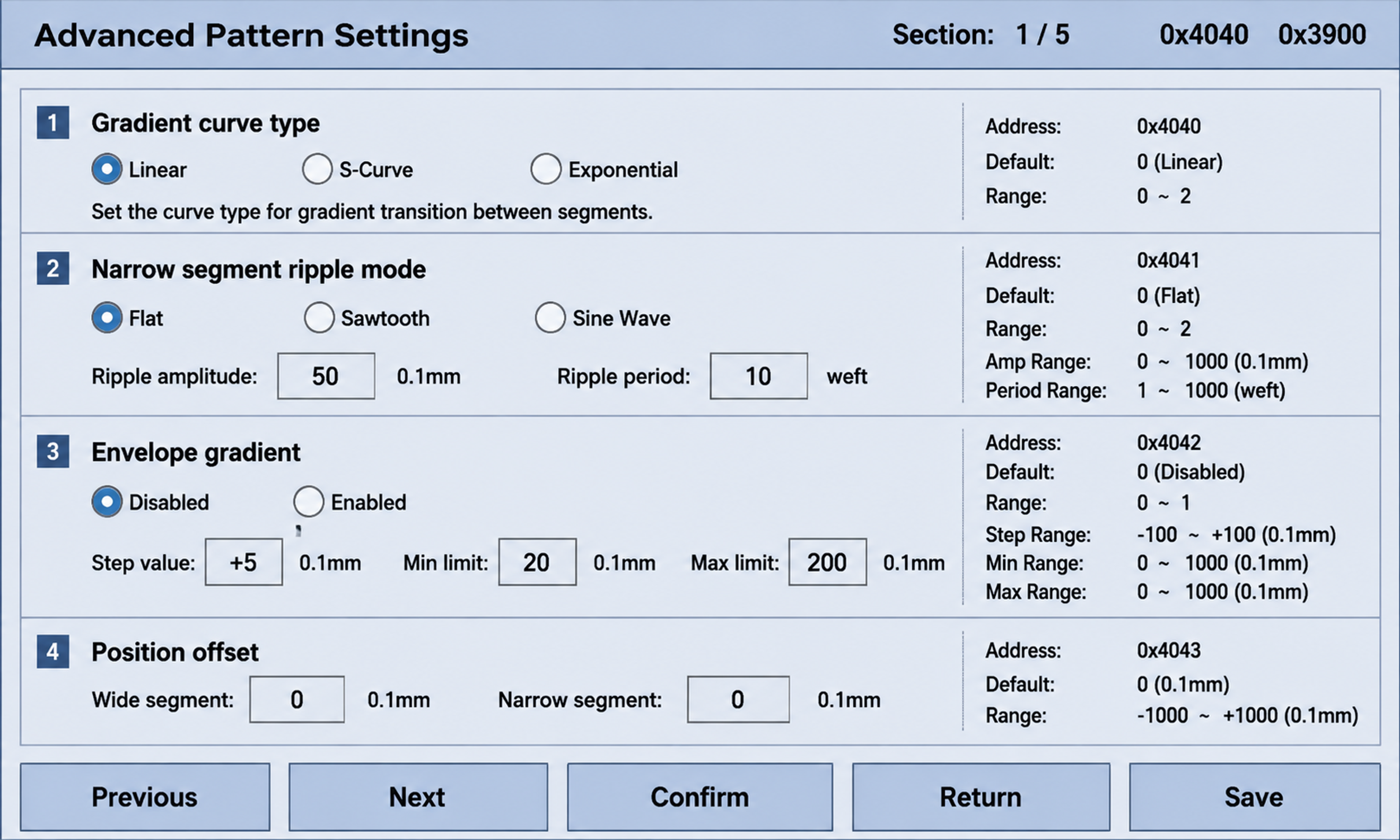
Industrial serial port HMI display screen interface, 800x480 landscape resolution, industrial style

1rc24jcy0zc...
2026.08.16Industrial serial port HMI display screen interface, 800x480 landscape resolution, industrial style
1rc24jcy0zc...
2026.08.16![Industrial serial port HMI display screen, 800x480 landscape, monochrome light blue-gray background RGB(202,214,240), clean industrial style, dark gray text and borders. Top title bar: left '★ Advanced Pattern Settings', right '[Back]' button. First info row: 'Total Sections: Section Name: Transition Section No.: Wefts:' with values left blank. Second row: two group boxes side by side. Left group box title 'Gradient Curve Type' with three hollow circle radio buttons [○ Linear] [○ S-Curve] [○ Exponential], all hollow no fill. Right group box title 'Narrow Segment Ripple' with three hollow circle radio buttons [○ Flat] [○ Sawtooth] [○ Sine], all hollow no fill. Third row: 'Ripple Amplitude: [ ] mm Ripple Period: [ ] wefts', input boxes empty. Fourth row: 'Envelope Control: [○ Enable] Step: [ ] mm/cycle', radio hollow. Next line: 'Envelope Range: [ ] ──── [ ] mm', two input boxes connected by horizontal line. Fifth row: 'Wide Segment Offset: [ ] mm Narrow Segment Offset: [ ] mm', input boxes empty. Sixth row: 'Section Transition: [○ Hard Switch] [○ Smooth] Transition Wefts: [ ]', radio hollow. Bottom row of 4 function buttons: [Apply] [Reset] [Save to USB] [Load from USB], buttons with dark gray background and white text, rounded rectangles, clear and bold with subtle 3D effect. All text in English, all radio circles hollow with no selection mark, all input fields empty, clean industrial serial screen aesthetic.](https://gd-cms.dancf.com/gd-cms/xi19e5/0/be55f97d-87c2-4349-9980-22a2c27b967a35758.jpeg?x-oss-process=image/resize,w_640,type_6/sharpen,120/interlace,1)
![Industrial serial port HMI display screen, 800x480 landscape, monochrome light blue-gray background RGB(202,214,240), clean industrial style, dark gray text and borders. Top title bar: left '★ Advanced Pattern Settings', right '[Back]' button. First info row: 'Total Sections: Section Name: Transition Section No.: Wefts:' with values left blank. Second row: two group boxes side by side. Left group box title 'Gradient Curve Type' with three hollow circle radio buttons [○ Linear] [○ S-Curve] [○ Exponential], all hollow no fill. Right group box title 'Narrow Segment Ripple' with three hollow circle radio buttons [○ Flat] [○ Sawtooth] [○ Sine], all hollow no fill. Third row: 'Ripple Amplitude: [ ] mm Ripple Period: [ ] wefts', input boxes empty. Fourth row: 'Envelope Control: [○ Enable] Step: [ ] mm/cycle', radio hollow. Next line: 'Envelope Range: [ ] ──── [ ] mm', two input boxes connected by horizontal line. Fifth row: 'Wide Segment Offset: [ ] mm Narrow Segment Offset: [ ] mm', input boxes empty. Sixth row: 'Section Transition: [○ Hard Switch] [○ Smooth] Transition Wefts: [ ]', radio hollow. Bottom row of 4 function buttons: [Apply] [Reset] [Save to USB] [Load from USB], buttons with dark gray background and white text, rounded rectangles, clear and bold with subtle 3D effect. All text in English, all radio circles hollow with no selection mark, all input fields empty, clean industrial serial screen aesthetic.](https://gd-cms.dancf.com/gd-cms/xi19e5/0/34e9a3b1-9d29-49fe-b978-c8fa36b0b2f835834.jpeg?x-oss-process=image/resize,w_640,type_6/sharpen,120/interlace,1)
![Translate the entire reference image into English while keeping exactly the same layout, style, and color scheme. Industrial serial port HMI screen, 800x480 landscape, light blue-gray background RGB(202,214,240), dark gray text and borders. Top title bar: left '★ Advanced Settings', right '[Back]' button with rounded border. First info row: 'Total Sections:' 'Section Name: Transition' 'Section No.:' 'Wefts:'. Row 2: '[Transition] Gradient Curve:' with three hollow radio circles ○ Linear ○ S-Curve ○ Exponential, right side '← Controls wide-to-narrow transition shape'. Row 3: '[Narrow] Ripple Mode:' with three hollow radio circles ○ Flat ○ Sawtooth ○ Sine Wave, right side '← Controls pattern on narrow segments'. Row 4: 'Ripple Amplitude: [ ] mm Period: [ ] wefts' with right note '← Pattern size and density'. Row 5: 'Envelope Control: ○ Enable Step: [ ] mm/cycle' with right note '← Pattern amplitude increases/decreases per cycle'. Row 6: 'Envelope Range: [ ] —— [ ] mm' with right note '← Min and max envelope amplitude'. Row 7: 'Wide Offset: [ ] mm Narrow Offset: [ ] mm' with right note '← Adjust base position of wide and narrow segments'. Row 8: 'Section Transition: ○ Hard Switch ○ Smooth Wefts: [ ]' with right note '← Transition mode and length between sections'. Bottom row: 4 dark gray rounded buttons with white text: [Apply] [Reset] [Save to USB] [Load from USB]. All text in English, all radio circles hollow, all input boxes empty, exact same layout and style as reference image.](https://gd-cms.dancf.com/gd-cms/xi19e5/0/5f01e219-07ad-4083-867e-fce9dbff04f136188.jpeg?x-oss-process=image/resize,w_640,type_6/sharpen,120/interlace,1)
![Translate the entire reference image into English while keeping exactly the same layout, style, and color scheme. Industrial serial port HMI screen, 800x480 landscape, light blue-gray background RGB(202,214,240), dark gray text and borders. Top title bar: left '★ Advanced Settings', right '[Back]' button with rounded border. First info row: 'Total Sections:' 'Section Name: Transition' 'Section No.:' 'Wefts:'. Row 2: '[Transition] Gradient Curve:' with three hollow radio circles ○ Linear ○ S-Curve ○ Exponential, right side '← Controls wide-to-narrow transition shape'. Row 3: '[Narrow] Ripple Mode:' with three hollow radio circles ○ Flat ○ Sawtooth ○ Sine Wave, right side '← Controls pattern on narrow segments'. Row 4: 'Ripple Amplitude: [ ] mm Period: [ ] wefts' with right note '← Pattern size and density'. Row 5: 'Envelope Control: ○ Enable Step: [ ] mm/cycle' with right note '← Pattern amplitude increases/decreases per cycle'. Row 6: 'Envelope Range: [ ] —— [ ] mm' with right note '← Min and max envelope amplitude'. Row 7: 'Wide Offset: [ ] mm Narrow Offset: [ ] mm' with right note '← Adjust base position of wide and narrow segments'. Row 8: 'Section Transition: ○ Hard Switch ○ Smooth Wefts: [ ]' with right note '← Transition mode and length between sections'. Bottom row: 4 dark gray rounded buttons with white text: [Apply] [Reset] [Save to USB] [Load from USB]. All text in English, all radio circles hollow, all input boxes empty, exact same layout and style as reference image.](https://gd-cms.dancf.com/gd-cms/xi19e5/0/3f8dd637-cc3e-46aa-bdc6-cf43528ceb5235109.jpeg?x-oss-process=image/resize,w_640,type_6/sharpen,120/interlace,1)
![工业串口HMI显示屏界面,800x480横屏分辨率,工业风格UI,主背景色调为RGB(202,214,249)浅蓝灰色,深灰色文字与边框,对比度清晰。顶部标题栏左侧显示"★★★ 高级图案设置 ★★★",右侧显示"总段: [ 1 ] / [ 5 ]"及地址"0x4040 0x3900"。主内容区为带边框的参数设置面板,包含4组参数:1.渐变曲线类型(线性/S曲线/指数三个圆形单选按钮,线性选中,下方小字说明线性=均匀 S曲线=平滑 指数=先慢后快,右侧标注地址0x4040、默认0、范围0-2),2.窄段波纹模式(平直/锯齿/正弦波三个单选按钮,平直选中,右侧地址0x4041;波纹振幅数值框显示50,单位0.1mm,范围0.0-50.0mm,地址0x4042;波纹周期数值框显示10,单位纬数,范围2-100纬,地址0x4043),3.包络渐变(禁用/启用单选按钮,禁用选中,地址0x4044;步进量+5,单位0.1mm/循环,地址0x4045;最小限制20,地址0x4046;最大限制200,地址0x4047),4.位置偏移(宽段数值框0,窄段数值框0,单位0.1mm,地址0x4048 0x4049)。底部一排5个矩形功能按键:上一页、下一页、确认、返回、保存,按键样式统一。嵌入式设备HMI风格,像素清晰锐利,线条硬朗,专业工业控制界面感,无多余装饰,全部文字为中文](https://gd-cms.dancf.com/gd-cms/xi19e5/0/887d662b-1315-4a05-a6a2-bec5a1bd71d435360.jpeg?x-oss-process=image/resize,w_640,type_6/sharpen,120/interlace,1)
![工业串口HMI显示屏界面,800x480横屏分辨率,工业风格UI,主背景色调为RGB(202,214,249)浅蓝灰色,深灰色文字与边框,对比度清晰。顶部标题栏左侧显示"★★★ 高级图案设置 ★★★",右侧显示"总段: [ 1 ] / [ 5 ]"及地址"0x4040 0x3900"。主内容区为带边框的参数设置面板,包含4组参数:1.渐变曲线类型(线性/S曲线/指数三个圆形单选按钮,线性选中,下方小字说明线性=均匀 S曲线=平滑 指数=先慢后快,右侧标注地址0x4040、默认0、范围0-2),2.窄段波纹模式(平直/锯齿/正弦波三个单选按钮,平直选中,右侧地址0x4041;波纹振幅数值框显示50,单位0.1mm,范围0.0-50.0mm,地址0x4042;波纹周期数值框显示10,单位纬数,范围2-100纬,地址0x4043),3.包络渐变(禁用/启用单选按钮,禁用选中,地址0x4044;步进量+5,单位0.1mm/循环,地址0x4045;最小限制20,地址0x4046;最大限制200,地址0x4047),4.位置偏移(宽段数值框0,窄段数值框0,单位0.1mm,地址0x4048 0x4049)。底部一排5个矩形功能按键:上一页、下一页、确认、返回、保存,按键样式统一。嵌入式设备HMI风格,像素清晰锐利,线条硬朗,专业工业控制界面感,无多余装饰,全部文字为中文](https://gd-cms.dancf.com/gd-cms/xi19e5/0/9a4422d0-7b93-4a00-b83b-6592821689c936018.jpeg?x-oss-process=image/resize,w_640,type_6/sharpen,120/interlace,1)
![工业串口显示屏HMI界面,800x480横屏,单色浅蓝灰底色RGB(202,214,240),简洁大气工业风格,深灰色文字和边框。顶部标题栏:左侧"★ 高级图案设置",右侧"[返回]"按钮。第一行信息栏:"总段: 段名: 过渡 段号: 纬数:",数值留空。第二行左右两个分组框:左侧分组框标题"渐变曲线类型",内有三个空心圆圈单选按钮[○ 线性] [○ S曲线] [○ 指数],全部空心无黑点;右侧分组框标题"窄段波纹",内有三个空心圆圈单选按钮[○ 平直] [○ 锯齿] [○ 正弦],全部空心无黑点。第三行:"波纹振幅: [ ] mm 波纹周期: [ ] 纬",输入框空白。第四行:"包络控制: [○ 启用] 步进: [ ] mm/循环",单选空心;下一行"包络范围: [ ] ──── [ ] mm",两个输入框中间用横线连接。第五行:"宽段偏移: [ ] mm 窄段偏移: [ ] mm",输入框空白。第六行:"总段过渡: [○ 硬切换] [○ 平滑] 过渡纬数: [ ]",单选空心。底部一排4个功能按键:[应用] [重置] [保存U盘] [加载U盘],按键深灰底白字,圆角矩形,清晰大气有立体感。整体布局规整,老式工业串口屏质感,全部中文,所有单选圆圈空心无选中标记,输入框空白。](https://gd-cms.dancf.com/gd-cms/xi19e5/0/9c029333-849c-464c-bc85-2b1dfd2526f735751.jpeg?x-oss-process=image/resize,w_640,type_6/sharpen,120/interlace,1)
![工业串口显示屏HMI界面,800x480横屏,完全复刻老式工控串口屏风格:深蓝色顶部标题栏、浅蓝色内容区背景、深蓝色边框线条、底部立体凸起灰色按键(按键带深蓝色外框和浮雕立体感)。顶部标题栏左侧"★★★ 高级图案设置 ★★★",右侧"总段: [ 1 ] / [ 5 ]"和地址"0x4040 0x3900"。主区域浅蓝底色,带深蓝色内边框的参数面板,包含4组参数,组间用深蓝色分隔线隔开:1.渐变曲线类型:三个空心圆圈单选按钮[○ 线性] [○ S曲线] [○ 指数],圆圈内不要黑点,全部为空心圆圈;下方小字说明"线性=均匀 S曲线=平滑 指数=先慢后快";右侧标注"地址: 0x4040"、"默认: 0"、"范围: 0-2"。2.窄段波纹模式:三个空心圆圈单选按钮[○ 平直] [○ 锯齿] [○ 正弦波],全部空心无黑点;下方小字"锯齿=三角波 正弦波=平滑起伏";波纹振幅:空白输入框[ ],单位0.1mm,范围(0.0-50.0mm),地址0x4042,默认50,范围0-500;波纹周期:空白输入框[ ],单位纬数,范围(2-100纬),地址0x4043,默认10,范围2-100。3.包络渐变:两个空心圆圈单选按钮[○ 禁用] [○ 启用],全部空心无黑点;步进量空白输入框,单位0.1mm/循环,范围(-5.0~+5.0mm),地址0x4045;最小限制空白输入框,单位0.1mm,地址0x4046;最大限制空白输入框,单位0.1mm,地址0x4047;每项右侧标注默认值和范围。4.位置偏移:宽段空白输入框,单位0.1mm,地址0x4048;窄段空白输入框,单位0.1mm,地址0x4049。所有单选圆圈都是空心的,没有黑点或填充。底部两排立体凸起灰色按键,按键有深蓝色边框和浮雕立体效果,按键文字为深蓝色,包括:上一页、下一页、确认、返回、保存、清空等。整体是传统老式工业串口屏的视觉风格,像素感字体,深蓝配色,立体按键,全部中文。](https://gd-cms.dancf.com/gd-cms/xi19e5/0/163c6760-297f-4eed-aeb3-2034f6d3379135177.jpeg?x-oss-process=image/resize,w_640,type_6/sharpen,120/interlace,1)
![工业串口HMI显示屏界面,800x480横屏分辨率,清新简约工业风格,主背景为RGB(202,214,249)浅蓝灰色,全部文字和线条使用中灰色而非纯黑色,视觉柔和舒适。顶部标题栏左侧显示"★★★ 高级图案设置 ★★★",右侧显示"总段: [ 1 ] / [ 5 ]"及地址"0x4040 0x3900"。主内容区为圆角浅边框参数面板,包含4组参数:1.渐变曲线类型(线性/S曲线/指数三个圆形单选按钮,线性为选中状态,下方小字说明线性=均匀 S曲线=平滑 指数=先慢后快,右侧标注地址、默认值、范围),2.窄段波纹模式(平直/锯齿/正弦波三个单选按钮,平滑选中,右侧地址;波纹振幅输入框为空无数字,单位0.1mm;波纹周期输入框为空无数字,单位纬数),3.包络渐变(禁用/启用单选按钮,禁用选中,地址;步进量输入框为空,单位0.1mm/循环;最小限制输入框为空;最大限制输入框为空),4.位置偏移(宽段输入框为空,窄段输入框为空,单位0.1mm)。所有数值输入框内均为空白,不显示任何数字。底部一排5个圆角功能按键:上一页、下一页、确认、返回、保存,按键为浅灰底中灰字,风格统一柔和。整体为现代扁平化工业HMI风格,无纯黑色元素,圆角设计,留白充足,清爽干净,全部文字为中文](https://gd-cms.dancf.com/gd-cms/xi19e5/0/0ea9268f-3f88-46c0-9477-9c2a0689488035362.jpeg?x-oss-process=image/resize,w_640,type_6/sharpen,120/interlace,1)
![参考图的布局和风格完全不变,将所有文字替换为中文。工业串口显示屏HMI界面,800x480横屏,浅蓝灰底色RGB(202,214,240),深灰色文字和边框。顶部标题栏:左侧"★ 钢扣/针座调试",右侧"[返回]"按钮。第一行:"调试模式: [● 正常] [○ 无限位]",正常为选中状态(实心点)。中间左右两个圆角分组框:左侧分组框标题"钢扣控制",内有"位置: mm","方向: [○ 正] [○ 反]"两个空心单选,下方三个深色立体大按键[正转] [反转] [停止],按键深灰底白字有立体感,"速度系数: [ ]"输入框。右侧分组框标题"织针控制",内有"位置: mm","方向: [○ 正] [○ 反]"两个空心单选,下方三个深色立体大按键[正转] [反转] [停止],"速度系数: [ ]"输入框。下方参数区:"最大行程: 钢扣 [ ] mm 针座 [ ] mm","脉冲/mm: 钢扣 [ ] 针座 [ ]","快速移动: [ ] mm"。底部一排4个深色立体大按键:[标定零点] [复位到最宽] [紧急停止] [进入调试]。所有正转/反转/停止按键都是醒目的深色立体按键样式。完全复刻参考图的布局、分组框样式、按键大小和立体效果,仅将文字全部改为中文。](https://gd-cms.dancf.com/gd-cms/xi19e5/0/3f463a99-2192-43eb-ae9c-21f859c0404036203.jpeg?x-oss-process=image/resize,w_640,type_6/sharpen,120/interlace,1)
![参考图的布局和风格完全不变,将所有文字替换为中文。工业串口显示屏HMI界面,800x480横屏,浅蓝灰底色RGB(202,214,240),深灰色文字和边框。顶部标题栏:左侧"★ 钢扣/针座调试",右侧"[返回]"按钮。第一行:"调试模式: [● 正常] [○ 无限位]",正常为选中状态(实心点)。中间左右两个圆角分组框:左侧分组框标题"钢扣控制",内有"位置: mm","方向: [○ 正] [○ 反]"两个空心单选,下方三个深色立体大按键[正转] [反转] [停止],按键深灰底白字有立体感,"速度系数: [ ]"输入框。右侧分组框标题"织针控制",内有"位置: mm","方向: [○ 正] [○ 反]"两个空心单选,下方三个深色立体大按键[正转] [反转] [停止],"速度系数: [ ]"输入框。下方参数区:"最大行程: 钢扣 [ ] mm 针座 [ ] mm","脉冲/mm: 钢扣 [ ] 针座 [ ]","快速移动: [ ] mm"。底部一排4个深色立体大按键:[标定零点] [复位到最宽] [紧急停止] [进入调试]。所有正转/反转/停止按键都是醒目的深色立体按键样式。完全复刻参考图的布局、分组框样式、按键大小和立体效果,仅将文字全部改为中文。](https://gd-cms.dancf.com/gd-cms/xi19e5/0/1501dd3a-70e5-4fe4-9624-7db012d9586335478.jpeg?x-oss-process=image/resize,w_640,type_6/sharpen,120/interlace,1)
![工业串口显示屏HMI界面,800x480横屏,单色浅蓝灰底色RGB(202,214,240),简洁大气工业风格,深灰色文字和边框。顶部标题栏:左侧"★ 钢扣/针座调试",右侧"[返回]"按钮。第一行:"调试模式: [○ 正常] [○ 无限位]",两个空心圆圈单选按钮。中间区域左右两个分组框:左侧分组框标题"钢扣控制",内有:"位置: mm"(数值留空),"方向: [○ 正] [○ 反]"(两个空心单选),下方三个小按钮[正转] [反转] [停止],"速度系数: [ ]"(输入框空白)。右侧分组框标题"织针控制",内有:"位置: mm"(数值留空),"方向: [○ 正] [○ 反]"(两个空心单选),下方三个小按钮[正转] [反转] [停止],"速度系数: [ ]"(输入框空白)。下方参数区:"最大行程: 钢扣 [ ] mm 针座 [ ] mm","脉冲/mm: 钢扣 [ ] 针座 [ ]","快速移动: [ ] mm"。底部一排4个功能按键:[标定零点] [复位到最宽] [紧急停止] [进入调试],按键深灰底白字,圆角矩形,清晰大气有立体感。整体布局规整,老式工业串口屏质感,全部中文,所有单选圆圈空心无选中标记,输入框空白。](https://gd-cms.dancf.com/gd-cms/xi19e5/0/2c92babc-aa2b-41b7-bb39-39ee9b51ea6536137.jpeg?x-oss-process=image/resize,w_640,type_6/sharpen,120/interlace,1)
![工业串口显示屏HMI界面设计,800x480横屏分辨率,深灰底色配白色文字的工业风格UI,顶部标题栏左侧显示"★★★ 高级图案设置 ★★★",右侧显示"总段: [ 1 ] / [ 5 ]"及地址"0x4040 0x3900",主内容区为带边框的参数设置面板,包含4组参数:1.渐变曲线类型(线性/S曲线/指数三个圆形单选按钮,线性为选中实心状态,下方小字说明线性=均匀 S曲线=平滑 指数=先慢后快,右侧标注地址0x4040、默认0、范围0-2),2.窄段波纹模式(平直/锯齿/正弦波三个单选按钮,平直选中,右侧地址0x4041;波纹振幅数值框显示50,单位0.1mm,范围0.0-50.0mm,地址0x4042;波纹周期数值框显示10,单位纬数,范围2-100纬,地址0x4043),3.包络渐变(禁用/启用单选按钮,禁用选中,地址0x4044;步进量+5,单位0.1mm/循环,地址0x4045;最小限制20,地址0x4046;最大限制200,地址0x4047),4.位置偏移(宽段数值框0,窄段数值框0,单位0.1mm,地址0x4048 0x4049),底部有一排5个矩形功能按键:上一页、下一页、确认、返回、保存,按键为深灰底白字带边框,整体为嵌入式设备操作界面风格,像素清晰锐利,线条硬朗,科技工业感,无多余装饰元素](https://gd-cms.dancf.com/gd-cms/xi19e5/0/b477ec59-0f35-47bb-98a3-3cf7be9bd1ce36183.jpeg?x-oss-process=image/resize,w_640,type_6/sharpen,120/interlace,1)
![Industrial serial port HMI display screen, 800x480 landscape, monochrome light blue-gray background RGB(202,214,240), clean industrial style, dark gray text and borders. Top title bar: left '★ Reed / Needle Bed Debug', right '[Back]' button. First row: 'Debug Mode: [○ Normal] [○ No Limit]', two hollow circle radio buttons. Middle area: two group boxes side by side. Left group box title 'Reed Control' containing: 'Position: mm' (value blank), 'Direction: [○ Forward] [○ Reverse]' (two hollow radios), below are three prominent rectangular buttons with dark gray background and white text: [FWD] [REV] [STOP], buttons are clearly visible with rounded corners and subtle 3D bevel effect, 'Speed Factor: [ ]' (empty input). Right group box title 'Needle Control' containing: 'Position: mm' (value blank), 'Direction: [○ Forward] [○ Reverse]' (two hollow radios), below are three prominent dark gray buttons: [FWD] [REV] [STOP], same button style as left group, 'Speed Factor: [ ]' (empty input). Below parameter area: 'Max Stroke: Reed [ ] mm Needle Bed [ ] mm', 'Pulses/mm: Reed [ ] Needle Bed [ ]', 'Fast Move: [ ] mm'. Bottom row of 4 function buttons: [Set Zero] [Reset to Max Width] [E-Stop] [Enter Debug]. All FWD/REV/STOP buttons inside group boxes are clearly styled as real buttons with dark fill, white text, and beveled edges, making them visually distinct and easy to press. All text in English.](https://gd-cms.dancf.com/gd-cms/xi19e5/0/de9c7198-be4e-4757-a679-b985ac73d26f36206.jpeg?x-oss-process=image/resize,w_640,type_6/sharpen,120/interlace,1)
![工业串口显示屏HMI界面,800x480横屏,单色浅蓝灰底色RGB(202,214,240),简洁大气工业风格,深灰色文字和边框。顶部标题栏:左侧"★ 钢扣/针座调试",右侧"[返回]"按钮。第一行:"调试模式: [○ 正常] [○ 无限位]",两个空心圆圈单选按钮。中间区域左右两个分组框:左侧分组框标题"钢扣控制",内有:"位置: mm"(数值留空),"方向: [○ 正] [○ 反]"(两个空心单选),下方三个小按钮[正转] [反转] [停止],"速度系数: [ ]"(输入框空白)。右侧分组框标题"织针控制",内有:"位置: mm"(数值留空),"方向: [○ 正] [○ 反]"(两个空心单选),下方三个小按钮[正转] [反转] [停止],"速度系数: [ ]"(输入框空白)。下方参数区:"最大行程: 钢扣 [ ] mm 针座 [ ] mm","脉冲/mm: 钢扣 [ ] 针座 [ ]","快速移动: [ ] mm"。底部一排4个功能按键:[标定零点] [复位到最宽] [紧急停止] [进入调试],按键深灰底白字,圆角矩形,清晰大气有立体感。整体布局规整,老式工业串口屏质感,全部中文,所有单选圆圈空心无选中标记,输入框空白。](https://gd-cms.dancf.com/gd-cms/xi19e5/0/ad598c04-be1e-49d9-965a-921f177ee2c836079.jpeg?x-oss-process=image/resize,w_640,type_6/sharpen,120/interlace,1)


![Industrial serial port HMI display screen, 800x480 landscape, monochrome light blue-gray background RGB(202,214,240), clean industrial style, dark gray text and borders. Top title bar: left '★ Reed / Needle Bed Debug', right '[Back]' button. First row: 'Debug Mode: [○ Normal] [○ No Limit]', two hollow circle radio buttons. Middle area: two group boxes side by side. Left group box title 'Reed Control' containing: 'Position: mm' (value blank), 'Direction: [○ Forward] [○ Reverse]' (two hollow radios), three small buttons below [FWD] [REV] [STOP], 'Speed Factor: [ ]' (empty input). Right group box title 'Needle Control' containing: 'Position: mm' (value blank), 'Direction: [○ Forward] [○ Reverse]' (two hollow radios), three small buttons below [FWD] [REV] [STOP], 'Speed Factor: [ ]' (empty input). Below parameter area: 'Max Stroke: Reed [ ] mm Needle Bed [ ] mm', 'Pulses/mm: Reed [ ] Needle Bed [ ]', 'Fast Move: [ ] mm'. Bottom row of 4 function buttons: [Set Zero] [Reset to Max Width] [E-Stop] [Enter Debug], buttons with dark gray background and white text, rounded rectangles, clear and bold with subtle 3D effect. All text in English, all radio circles hollow with no selection mark, all input fields empty, clean industrial serial screen aesthetic.](https://gd-cms.dancf.com/gd-cms/xi19e5/0/c73306b8-f6c0-49b3-afed-8de4b96733ef36330.jpeg?x-oss-process=image/resize,w_640,type_6/sharpen,120/interlace,1)

![基于参考图的老式工业串口屏风格(深蓝标题栏、浅蓝表格底色、深蓝边框、立体凸起灰色按键),重新设计高级图案设置页面,800x480横屏。顶部深蓝色标题栏:左侧"★★★ 高级图案设置 ★★★",右侧"总段: [ ] / [ ]",总段数字留空。主区域浅蓝底色带深蓝边框,4组参数用深蓝分隔线和左侧标签栏区分表格布局:1.渐变曲线类型(左侧标签栏,右侧三个空心圆圈单选○线性 ○S曲线 ○指数,圆圈内无黑点无对勾,全部空心;再右侧地址默认范围列),2.窄段波纹模式(○平直 ○锯齿 ○正弦波,全部空心无黑点;波纹振幅空白输入框、波纹周期空白输入框),3.包络渐变(○禁用 ○启用,全部空心无黑点;步进量、最小限制、最大限制空白输入框),4.位置偏移(宽段空白输入框、窄段空白输入框,单位0.1mm)。所有单选按钮都是空心圆圈,不要勾选标记。底部第一排5个立体灰色按键:[ 保存 ] [ 恢复默认 ] [ 应用所有 ] [ 查看效果 ] [ ← 返回段列表 ],按键为立体凸起灰色带深蓝边框。最底部状态栏:"状态: ★ 当前总段 : 曲线=线性, 波纹=锯齿, 包络=启用(+0.5mm/循环)"。整体完全复刻参考图的老式工控串口屏视觉风格,深蓝配色、立体按键、像素字体,全部中文,单选圆圈全部空心无选中标记。](https://gd-cms.dancf.com/gd-cms/xi19e5/0/32f5fa57-35e4-4aaa-890a-f939aebfcf8f35745.jpeg?x-oss-process=image/resize,w_640,type_6/sharpen,120/interlace,1)


